


Page 570 - Subyek Computer Aided Design - [David Planchard] Engineering Design with SOLIDWORKS
P. 570
Top-Down and Sheet Metal Parts                                                                                                                             Engineering Design with SOLIDWORKS® 2018


                                                •  Insert Sheet Metal assembly features.


                                                •  Replace Components in an assembly.


                                                •  Insert a Design Table.


                                                •  Create a sheet metal part by starting with a solid part and inserting a Shell feature,


                                                            Rip feature, and Sheet Metal Bends feature.


                                                •  Create a Sheet Metal part by starting with a Base Flange feature.


                                                •  Use the following SOLIDWORKS features: Extruded Boss/Base, Extruded Cut,


                                                            Shell, Hole Wizard, Linear Pattern, Sketch Driven Pattern, Pattern Driven Component


                                                            Pattern, Rip, Insert Bends, Flatten, Hem, Edge Flange, Jog, Flat Pattern, Break


                                                            Comer/Comer Trim, Miter Flange, Base Flange/Tab, Unfold/Fold, Mirror


                                                            Components and Replace Component.


                                                Project Situation


                                                You now work for a different company. Life is full with opportunities. You are part of a


                                                global project design team that is required to create a family of electrical boxes for


                                                general industrial use. You are the project manager.


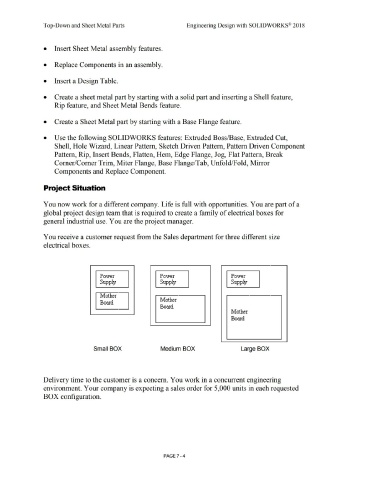
                                                You receive a customer request from the Sales department for three different size


                                                electrical boxes.


                                                                                                             Power                                                            Power                                                                        Power


                                                                                                             Supply                                                           Supply                                                                       Supply


                                                                                                             l\'1:other

                                                                                                                                                                              Mother
                                                                                                             Board

                                                                                                                                                                              Board

                                                                                                                                                                                                                                                           Mother


                                                                                                                                                                                                                                                           Board


                                                                                                      Small BOX                                                                Medium BOX                                                                            Large BOX


                                                Delivery time to the customer is a concern. You work in a concurrent engineering


                                                environment. Your company is expecting a sales order for 5,000 units in each requested


                                                BOX configuration.


                                                                                                                                                                                  PAGE 7 - 4

