


Page 574 - Subyek Computer Aided Design - [David Planchard] Engineering Design with SOLIDWORKS
P. 574
Top-Down and Sheet Metal Parts                                                                                                                             Engineering Design with SOLIDWORKS® 2018


                                                BOX Assembly Overview


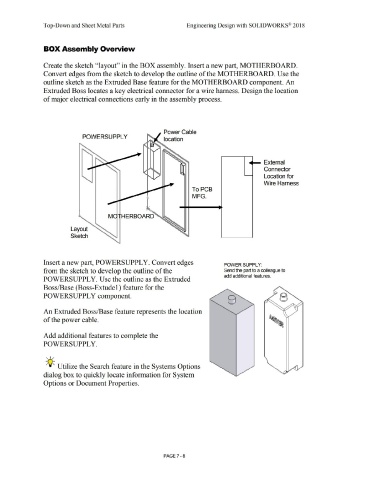
                                                Create the sketch ''layout'' in the BOX assembly. Insert a new part, MOTHERBOARD.


                                                Convert edges from the sketch to develop the outline of the MOTHERBOARD. Use the


                                                outline sketch as the Extruded Base feature for the MOTHERBOARD component. An


                                                Extruded Boss locates a key electrical connector for a wire harness. Design the location


                                                of major electrical connections early in the assembly process.


                                                                                                                                                                                  Power Cable

                                                                                          POWERSUPPL Y
                                                                                                                                                                                  location


                                                                                                                                                                                                                                                                                  -           External


                                                                                                                                                                                                                                                                                              Connector


                                                                                                                                                                                                                                                                                              Location for


                                                                                                                                                                                                                                                                                              Wire Harness


                                                                                                                                                                                                                To PCB


                                                                                                                                                                                                                 MFG.


                                                                                                                      M             HERBOARD


                                                                             Layout


                                                                             Sketch


                                                Insert a new part, POWERSUPPLY. Convert edges                                                                                                                                                      POWER SUPPLY:


                                                from the sketch to develop the outline of the                                                                                                                                                      Send the part to a colleague to

                                                                                                                                                                                                                                                   add additional features.
                                                POWERSUPPLY. Use the outline as the Extruded


                                                Boss/Base (Boss-Extude 1) feature for the


                                                POWERSUPPL Y component.


                                                An Extruded Boss/Base feature represents the location


                                                of the power cable.


                                                Add additional features to complete the


                                                POWERSUPPLY.


                                                   , ,/


                                                  -;Q~ Utilize the Search feature in the Systems Options


                                                dialog box to quickly locate information for System


                                                Options or Document Properties.


                                                                                                                                                                                  PAGE 7 - 8

