


Page 384 - Accounting Information Systems
P. 384
CHA P TER 8        Financial Reporting and Management Reporting Systems  355

                       XBRL—Reengineering Financial Reporting

                       Online reporting of financial data has become a competitive necessity for publicly traded organizations.
                       Currently, most organizations accomplish this by placing their financial statements and other financial
                                                                                     1
                       reports on their respective Web sites as HTML (Hyper Text Markup Language ) documents. These docu-
                       ments can then be downloaded by users such as the SEC, financial analysts, and other interested parties.
                       The HTML reports, however, cannot be conveniently processed through IT automation. Performing any
                       analysis on the data contained in the reports requires them to be manually entered into the user’s informa-
                       tion system.
                         The solution to this problem is eXtensible Business Reporting Language (XBRL), which is the Inter-
                       net standard specifically designed for business reporting and information exchange. The objective of
                       XBRL is to facilitate the publication, exchange, and processing of financial and business information.
                       XBRL is a derivative of another Internet standard called XML (eXtensible Markup Language).


                       XML
                       XML is a metalanguage for describing markup languages. The term extensible means that any markup
                       language can be created using XML. This includes the creation of markup languages capable of storing
                       data in relational form in which tags (or formatting commands) are mapped to data values. Thus, XML
                       can be used to model the data structure of an organization’s internal database.
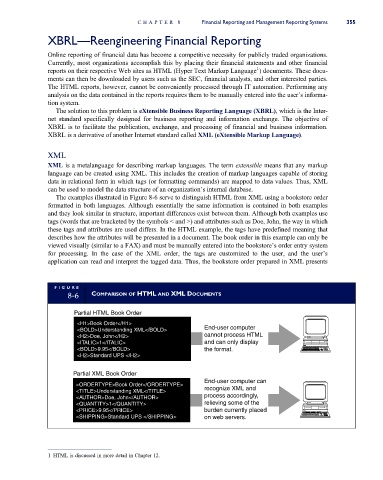
                         The examples illustrated in Figure 8-6 serve to distinguish HTML from XML using a bookstore order
                       formatted in both languages. Although essentially the same information is contained in both examples
                       and they look similar in structure, important differences exist between them. Although both examples use
                       tags (words that are bracketed by the symbols < and >) and attributes such as Doe, John, the way in which
                       these tags and attributes are used differs. In the HTML example, the tags have predefined meaning that
                       describes how the attributes will be presented in a document. The book order in this example can only be
                       viewed visually (similar to a FAX) and must be manually entered into the bookstore’s order entry system
                       for processing. In the case of the XML order, the tags are customized to the user, and the user’s
                       application can read and interpret the tagged data. Thus, the bookstore order prepared in XML presents


                         FI GUR E
                             8-6    COMPARISON OF HTML AND XML DOCUMENTS


                              Partial HTML Book Order
                               <H1>Book Order</H1>
                               <BOLD>Understanding XML</BOLD>         End-user computer
                               <H2>Doe, John</H2>                     cannot process HTML
                               <ITALIC>1</ITALIC>                     and can only display
                               <BOLD>9.95</BOLD>                      the format.
                               <H2>Standard UPS </H2>

                              Partial XML Book Order
                                                                      End-user computer can
                               <ORDERTYPE>Book Order</ORDERTYPE>
                               <TITLE>Understanding XML</TITLE>       recognize XML and
                               <AUTHOR>Doe, John</AUTHOR>             process accordingly,
                               <QUANTITY>1</QUANTITY>                 relieving some of the
                               <PRICE>9.95</PRICE>                    burden currently placed
                               <SHIPPING>Standard UPS </SHIPPING>     on web servers.


                       1 HTML is discussed in more detail in Chapter 12.

