


Page 426 -
P. 426
leftovers


          #6: Command-line execution


           Throughout the 10½ chapters of this book, you’ve consistently
           executed your code from within the IDLE programming
           environment. This has been great while developing and working
           on your code, but it’s probably not how you want your users to run
           your programs. It turns out there’s more than one way to do it
           when it comes to running your code. The method available to you
           (and your users) will vary depending on the operating system you’re
           using.
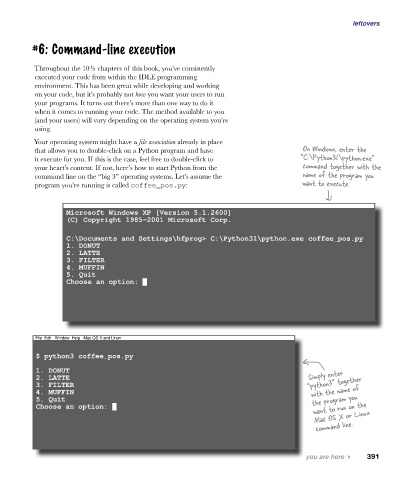
          Your operating system might have a file association already in place
           that allows you to double-click on a Python program and have              On Windows, enter the
           it execute for you. If this is the case, feel free to double-click to     “C:\Python31\python.exe”
           your heart’s content. If not, here’s how to start Python from the         command together with the
           command line on the “big 3” operating systems. Let’s assume the           name of the program you
           program you’re running is called coffee_pos.py:                           want to execute.


                   Microsoft Windows XP [Version 5.1.2600]
                   (C) Copyright 1985-2001 Microsoft Corp.

                   C:\Documents and Settings\hfprog> C:\Python31\python.exe coffee_pos.py
                   1. DONUT
                   2. LATTE
                   3. FILTER
                   4. MUFFIN
                   5. Quit
                   Choose an option: █


           File  Edit   Window  Help   Mac OS X and Linux

           $ python3 coffee_pos.py

           1. DONUT                                                                    Simply enter
           2. LATTE                                                                    “python3” together
           3. FILTER
           4. MUFFIN                                                                   with the name of
           5. Quit                                                                      the program you
           Choose an option: █                                                          want to run on the
                                                                                        Mac OS X or Linux
                                                                                         command line.


                                                                                      you are here 4    391

