


Page 131 - Process simulation and control using Aspen
P. 131
120       PROCESS SIMULATION AND CONTROL USING ASPKN'


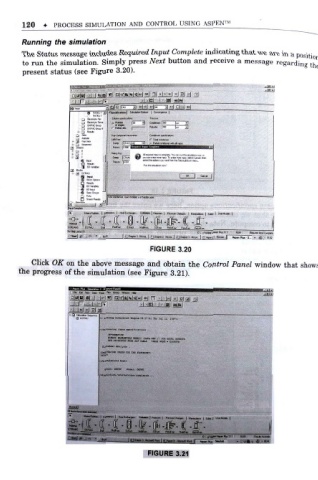
        Running the simulation
        The Status message includes Required Input Complete indicating that we are in a positio     n
        to run the simulation. Simply press Next button and receive a message regarding th          e
        present status (see Figure 3.20).


                             fiT  TTJ
                                           [30  jgi i Cm*
                           Jj UkifIC Gkc        fioWI ]300
                                    KiHictoipooet r
                             s*.
                        .
                                     Com  [ETMYLEHE
                         Smm
                                              itjucioMtiTCienpu Totftw- x*npu «ccC*wM tt*n
                                                             f
                                     flBMy: [0 0C1
                            E0V»Mblw
                           _
                        - 33 Dsmni
                           a -
                           Q  Be-* C-pua-i
                            Mb
                       H

                       STRWMS


                                                FIGURE 3.20


           Click OK on the above message and obtain the Control Panel window that show s
       the progress of the simulation (see Figure 3 .21).


                                         t
                           f
                        F»» Ee ««  £to T«* An iMy -AWo*  -H*
                          ]aj®iJ i£ll w| KHIMKI h>\ 0 >Nh| *i lacal
                               -


                                   * bs atrsitrro rkx sot iabli  taw


                       - EH

                                                                             HUM
                                                                                 fit -. I
                                                FIGURE 3.21

