


Page 220 - Statistics II for Dummies
P. 220
204        Part III: Analyzing Variance with ANOVA


                                Your next question may be: Okay, which combination of detergent brand
                                and water temperature is best? To answer this question, I did multiple com-
                                parisons on the means from all 12 combinations. (To do this, I followed the
                                Minitab directions from the previous section.) Luckily, Tukey gives me an
                                overall error rate of only 5 percent, so doing this many tests doesn’t lead to
                                making a lot of incorrect conclusions.

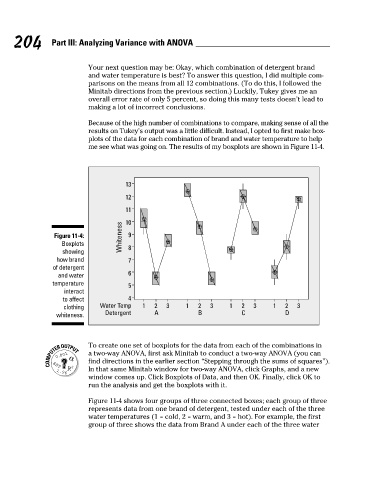
                                Because of the high number of combinations to compare, making sense of all the
                                results on Tukey’s output was a little difficult. Instead, I opted to first make box-
                                plots of the data for each combination of brand and water temperature to help
                                me see what was going on. The results of my boxplots are shown in Figure 11-4.


                                           13

                                           12
                                           11
                                         Whiteness
                       Figure 11-4:        10 9
                         Boxplots
                         showing           8
                       how brand           7
                      of detergent
                                           6
                        and water
                      temperature          5
                         interact
                         to affect         4
                         clothing   Water Temp  1  2  3    1   2  3    1   2  3     1  2  3
                                     Detergent     A           B           C           D
                       whiteness.


                                 To create one set of boxplots for the data from each of the combinations in
                                a two-way ANOVA, first ask Minitab to conduct a two-way ANOVA (you can
                                find directions in the earlier section “Stepping through the sums of squares”).
                                In that same Minitab window for two-way ANOVA, click Graphs, and a new
                                window comes up. Click Boxplots of Data, and then OK. Finally, click OK to
                                run the analysis and get the boxplots with it.

                                Figure 11-4 shows four groups of three connected boxes; each group of three
                                represents data from one brand of detergent, tested under each of the three
                                water temperatures (1 = cold, 2 = warm, and 3 = hot). For example, the first
                                group of three shows the data from Brand A under each of the three water


          17_466469-ch11.indd   204                                                                   7/24/09   9:44:19 AM

