


Page 226 - Statistics II for Dummies
P. 226
210        Part III: Analyzing Variance with ANOVA


                                in the simple linear regression analysis tells you whether or not the x vari-
                                able does a significant job in predicting y. (For the details on simple linear
                                regression, see Chapter 4.)

                                To do a simple linear regression using Minitab, enter your data in two col-
                                umns: the first column for your x variable and the second column for your y
                                variable (as in Table 12-1). Go to Stat>Regression>Regression. Click on your y
                                variable in the left-hand box; the y variable then appears in the Response box
                                on the right-hand side. Click on your x variable in the left-hand box; the x vari-
                                able then appears in the Predictor box in the right-hand side. Click OK, and
                                your regression analysis is done. As part of every regression analysis, Minitab
                                also provides you with the corresponding ANOVA results, found at the bottom
                                of the output.
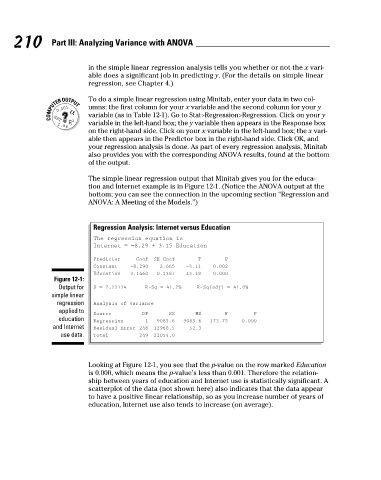
                                The simple linear regression output that Minitab gives you for the educa-
                                tion and Internet example is in Figure 12-1. (Notice the ANOVA output at the
                                bottom; you can see the connection in the upcoming section “Regression and
                                ANOVA: A Meeting of the Models.”)


                                  Regression Analysis: Internet versus Education
                                  The regression equation is
                                  Internet = −8.29 + 3.15 Education
                                  Predictor   Coef  SE Coef    T      P
                                  Constant  −8.290  2.665  −3.11   0.002
                                  Education  3.1460  0.2387  13.18  0.000
                       Figure 12-1:
                        Output for   S = 7.23134   R-Sq = 41.2%   R-Sq(adj) = 41.0%
                      simple linear
                       regression   Analysis of Variance
                        applied to
                                  Source       DF      SS     MS      F       P
                        education   Regression  1  9085.6  9085.6  173.75  0.000
                      and Internet   Residual Error 248  12968.5  52.3
                        use data.  Total      249  22054.0


                                Looking at Figure 12-1, you see that the p-value on the row marked Education
                                is 0.000, which means the p-value’s less than 0.001. Therefore the relation-
                                ship between years of education and Internet use is statistically significant. A
                                scatterplot of the data (not shown here) also indicates that the data appear
                                to have a positive linear relationship, so as you increase number of years of
                                education, Internet use also tends to increase (on average).


          18_466469-ch12.indd   210                                                                   7/24/09   9:45:29 AM

