


Page 723 - 02. Subyek Computer Aided Design - Beginner’s Guide to SOLIDWORKS 2019- Level 1 by Alejandro Reyes
P. 723
Collaboration: eDrawings
Chapter 9: Collaboration: eDrawings
How to collaborate with non-SOLID WORKS users
Sometimes we need to collaborate with other members of the design team
in the same room, same building, or even across the world. With the convenience
of e-mail, it's easier than ever to share our designs using eDrawings. We can send
our extended design team, customers or suppliers a file by e-mail with all the
design information needed for them to review and send back feedback to the
designer. A big advantage of eDrawings is that it is available for Windows and
Apple, iPad, iPhone, and Android devices.
We can generate eDrawings files from Parts, Assemblies, Drawings, and
simulation studies. The only thing we need to do is to press the Publish eDrawings
File icon from the "Save" fly-out toolbar, or go to the menu "File, Publish to
eDrawings" while the document we want to share is active. The eDrawings viewer
will be loaded with the same document. After we generate an eDrawings file, it
becomes a read-only file; we cannot modify it, but we can print it, zoom in, or out,
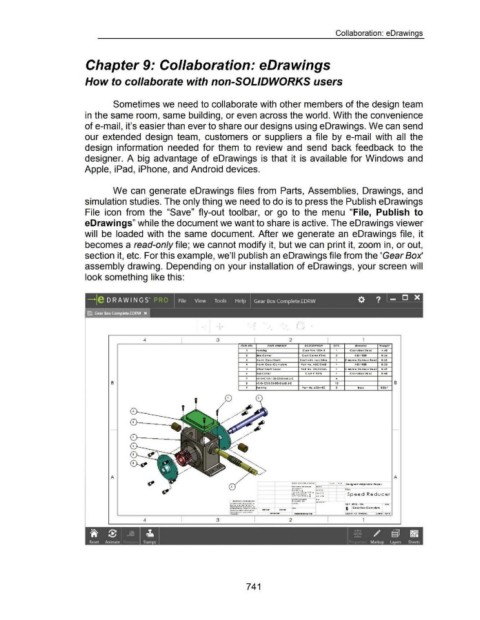
section it, etc. For this example, we'll publish an eDrawings file from the 'Gear Box'
assembly drawing. Depending on your installation of eDrawings, your screen will
look something like this:
_)! r )
. -.
4 3 2 1
ll'lMNO. 'A/IJ NQM &l./1 l)l. J Clt,JION QTY. MOtetffO, Wtidgbt
1 OVSI"'Q C osr Pf~ IZ3• ·' Cosr A.loy Sf'Q etl •.•0
'
2 be Cover Cosr COYQr f 3•~ ~ A IS II 020 D.~.!.
~ f"'o '"' Ceto rS"'otr s"o*' ~ .-,. •et x Ort.tet ' c ttfO"Pet srot,.IQ t:t: 9-etetl D.~~
4 ~Off't\ Cetor Co 'J'I Okl:te Po rr ~o . A lC ·7.-.6!. ' A IS II 020 D.~~
s ~H~etr Sttott Ceto r PQtf '40 . OCSo-:l:l&~ ' C "fO't!Ct SI'OI"'IQ SS 9'0:0:1 o.•t
' 0 0 COVQ:f C asr f '!.16 ' Cosr AIOV Sf'IQ: Ctl o.•a
7 x-s .. c s o.• Ja·32xo~xo~-s &
B a X·S• CS 0.2~-2DxO~xD.!Io..S oz B
9 vs "11"10 Porr ~o . ~J&.a.·JC z ltOU OD~'
'
r--__---------- ' '
'
A A
.. , ...... ~ ................ ''" ... .. llht.
·~ ..... ~--·
...... _.. ......... '
....... _ ........ _ . .. ........ Speed Reducer
... .... ·-·· ~ ... ~ ........... .
........ ~ ......... _ ............ . )~ t .,..~ . o~o. ttv
.. ~ .................. ~ · · ·
.......... ~ ............. -... . ........... . .... B C Qor l ox ca,.., oiQI'Q
• .._ •• ,, ........... ,H ..... . ... '
.... H ' ~O ..... ¥ ....... ,,., o
4 3 2 1
'it $ I _IQ I J:. I I I ~;· ~ ~
Reset Animate Stamps Martrup Layers Sheets
741

