


Page 725 - 02. Subyek Computer Aided Design - Beginner’s Guide to SOLIDWORKS 2019- Level 1 by Alejandro Reyes
P. 725
Collaboration: eDrawings


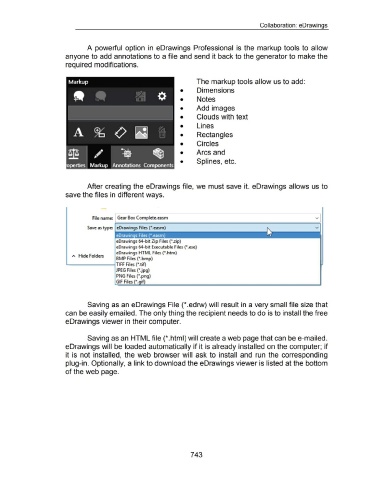
                                                                        A  powerful  option  in  eDrawings  Professional  is  the  markup tools to  allow


                                                      anyone to add annotations to a file and send it back to the generator to make the


                                                      required modifications.


                                                                                                                                                                The markup tools allow us to add:


                                                                                                                                                   •            Dimensions


                                                                                                                                                   •            Notes


                                                                                                                                                   •            Add images


                                                                                                                                                   •            Clouds with text


                                                                                                                                                   •            Lines


                                                                                                                                                   •            Rectangles


                                                                                                                                                   •            Circles


                                                                                                                                                   •            Arcs and


                                                                                                                                                   •            Splines, etc.


                                                                        After creating the eDrawings file, we must save it.  eDrawings allows us to


                                                      save the files in different ways.


                                                                                   -


                                                                            File name: I Gear Box Complete.easm


                                                                        Save as type:  eDrawings Files (*.easm)                                                                                                                                                 v


                                                                                               eDrawings 64-bit Zip Files (*.zip)

                                                                                               eDrawings 64-bit Executable Files (*.exe)

                                                                                               eDrawings HTML Files (*.htm)
                                                           A  Hide Folders
                                                                                               BMP Files (jl'.bmp)

                                                      1.---------i TIFF Files (jl'.tif)

                                                                                               JPEG Files (*.jpg)

                                                                                               PNG Files (jl'.png)

                                                                                               GIF Files           .


                                                                        Saving as an eDrawings File (* .edrw) will result in a very small file size that


                                                      can be easily emailed. The only thing the recipient needs to do is to install the free


                                                      eDrawings viewer in their computer.


                                                                        Saving as an HTML file (*.html) will create a web page that can bee-mailed.


                                                      eDrawings will  be loaded automatically if it is already installed on the computer; if


                                                      it  is  not installed,  the web browser will  ask to  install  and  run  the  corresponding


                                                      plug-in. Optionally, a link to download the eDrawings viewer is listed at the bottom


                                                      of the web page.


                                                                                                                                                           743

