


Page 729 - 02. Subyek Computer Aided Design - Beginner’s Guide to SOLIDWORKS 2019- Level 1 by Alejandro Reyes
P. 729
Appendix


                                                      Appendix


                                                      Document templates


                                                                        One  of the  main  reasons  to  have  multiple  templates  is  to  have  different


                                                      settings, especially units. We can have millimeter and inch templates, pre-defined


                                                      materials for part templates, dimensioning standards, etc. and every time we make


                                                      a new part based on that template, the new document will have the same settings


                                                      of the template. A good idea is to have a folder to store our templates and  add  it


                                                      to the list of SOLIDWORKS templates.


                                                                        Using  Windows Explorer,  make a  new folder to  store our new templates.


                                                      For this example, we'll make a new folder in the Desktop called "MySWTemplates."


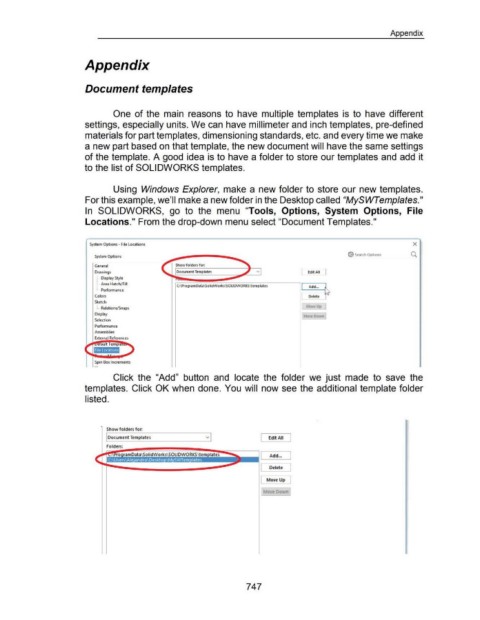
                                                      In  SOLIDWORKS,  go  to  the  menu  "Tools,  Options,  System  Options,  File


                                                      Locations." From the drop-down menu select "Document Templates."


                                                         System Options - File Locations                                                                                                                                                                           X


                                                                                                                                                                                                                           @ Search Options                       0.
                                                            System Options

                                                            General                                            Show folders for:

                                                            Drawings
                                                             :···· Display Style
                                                             ! .... Area Hatch/ Fill                                                                                                          I  Add...  ~

                                                             L .. Performance
                                                            Colors                                                                                                                                Delete
                                                                                                                                                                                                        ----'
                                                            Sketch
                                                                                                                                                                                                 Move Up
                                                             L .. Relations/ Snaps
                                                            Display
                                                            Selection

                                                            Performance
                                                            Assemblies

                                                            External References


                                                            Spin Box Increments


                                                                        Click  the  "Add"  button  and  locate  the  folder  we  just  made  to  save  the


                                                      templates.  Click OK when done. You  will  now see the additional template folder


                                                      listed.


                                                                   Show folders for.
                                                                                                                                                                         Edit All  I
                                                                   I Document Templates                                                                             L


                                                                   Folders:


                                                                                                                                                                    L     Add ... j


                                                                                                                                                                    L Delete':=J


                                                                                                                                                                                      1
                                                                                                                                                                    I Move Up


                                                                                                                                                                      Move Down


                                                                                                                                                           747

