


Page 724 - 02. Subyek Computer Aided Design - Beginner’s Guide to SOLIDWORKS 2019- Level 1 by Alejandro Reyes
P. 724
Beginner's Guide to SOLIDWORKS 2019- Level I


                                                      If the eDrawings file is generated using SOLIDWORKS Office Professional


                                    or  the  educational  edition,  the  eDrawings  Professional  version  is  loaded.


                                    eDrawings  Professional  includes additional  options,  including  tools to  move  the


                                    components in  assemblies, measure, add  markups and stamps and, if it's a part


                                    or assembly, make section views of the models.


                                                      Selecting  the  "Animate"  command  will  allow  us  to  navigate  the  different


                                    views in  the eDrawings file.  Pressing "Play" animates the views and  will  change


                                    from  one to  the  next.  At any time, the  animation  can  be  stopped, and  the view


                                    zoomed in, rotated and  an ned.


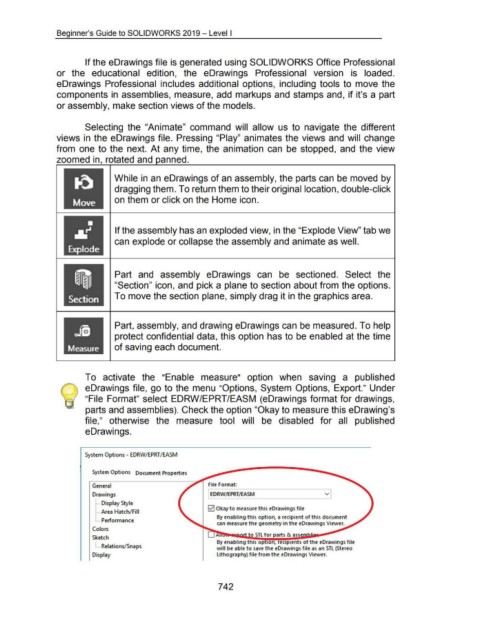
                                                                        While in an eDrawings of an assembly, the parts can be moved by


                                                                        dragging them. To return them to their original location, double-click


                                                                        on them or click on the Home icon.


                                                                         If the assembly has an exploded view, in the "Explode View" tab we


                                                                        can explode or collapse the assembly and animate as well.


                                                                         Part  and  assembly  eDrawings  can  be  sectioned.  Select  the


                                                                        "Section" icon, and pick a plane to section about from the options.


                                                                         To move the section plane, simply drag it in the graphics area.


                                               JS                        Part, assembly, and drawing eDrawings can be measured. To help

                                                                         protect confidential data, this option has to be enabled at the time


                                           Measure                      of saving each document.


                                                      To  activate  the  "Enable  measure"  option  when  saving  a  published


                                                      eDrawings file, go to the menu "Options, System  Options, Export." Under


                                                /  "File  Format" select EDRW /EPRT/EASM  (eDrawings format for drawings,


                                                      parts and assemblies). Check the option "Okay to measure this eDrawing's


                                                      file,"  otherwise  the  measure  tool  will  be  disabled  for  all  published


                                                      eDrawings.


                                                      System Options- EDRW/ EPRT/ EASM


                                                           System Options  Document Properties


                                                           General                                                                 File Format:

                                                           Drawings                                                                ~RW/EPRT/EASM


                                                             ~ .... Display Style
                                                                                                                                   0  Okay to measure this eDrawings file
                                                             ~ .... Area Hatch/ Fill
                                                                                                                                         By enabling this option, a recipient of this document
                                                             ~ .... Performance
                                                                                                                                         can measure the geometry in the eDrawings Viewer.
                                                           Colors
                                                                                                                                                            to STL for parts & ass
                                                           Sketch
                                                                                                                                         By enabling this op 1on, recipients of the eDrawings file
                                                             ~ .... Relations/Snaps
                                                                                                                                        will  be able to save the eDrawings file as an STL (Stereo
                                                           Display                                                                       lithography) file from the eDrawings Viewer.


                                                                                                                                         742

