


Page 732 - 02. Subyek Computer Aided Design - Beginner’s Guide to SOLIDWORKS 2019- Level 1 by Alejandro Reyes
P. 732
Beginner's Guide to SOLIDWORKS 2019- Level I
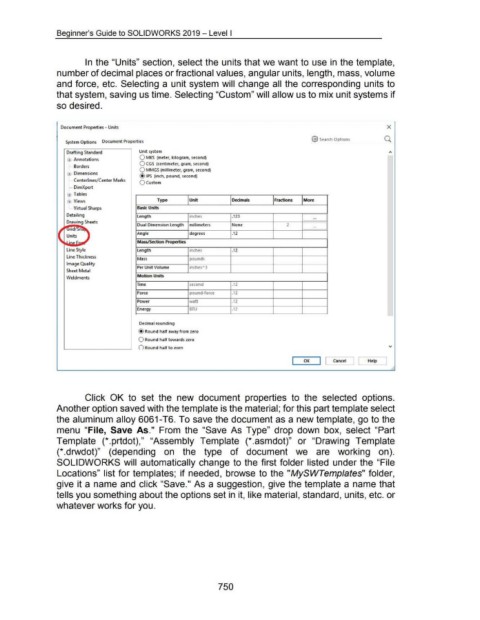
In the "Units" section, select the units that we want to use in the template,
number of decimal places or fractional values, angular units, length, mass, volume
and force, etc. Selecting a unit system will change all the corresponding units to
that system, saving us time. Selecting "Custom" will allow us to mix unit systems if
so desired.
Document Properties - Units X
'
@ Search Options
System Options Document Properties
Drafting Standard Unit system
0 MKS (meter, kilogram, second)
$ .. Annotations
0 CGS (centimeter, gram, second)
! .... Borders
0 MMGS (millimeter, gram, second)
$ .. Dimensions
@ IPS (inch, pound, second)
! .... Centerlines/ Center Marks
O custom
! .... DimXpert
$ .. Tables
$ .. Views Type Unit Decimals Fractions More
L. Virtual Sharps Basic Units
Detailing length inches .123 ...
Drawing Sheets
Dual Dimension length millimeters None 2 L ...
i{Jrid/ Sn
Angle degrees .12
Units
ine [:. ~ Mass/Section Properties
Line Style length inches .12
Line Thickness
Mass pounds
Image Quality
Per Unit Volume inches" 3
Sheet Metal
Motion Units
Weldments
Time second .12
Force pound-force .12
Power watt .12
Energy BTU .12
....._
Decimal rounding
@ Round half away from zero
0 Round half towards zero
0 Round half to even 'Y
--,
I OK I Cancel ] [ Help
A
Click OK to set the new document properties to the selected options.
Another option saved with the template is the material; for this part template select
the aluminum alloy 6061-T6. To save the document as a new template, go to the
menu "File, Save As." From the "Save As Type" drop down box, select "Part
Template (*.prtdot)," "Assembly Template (*.asmdot)" or "Drawing Template
(*.drwdot)" (depending on the type of document we are working on).
SOLIDWORKS will automatically change to the first folder listed under the "File
Locations" list for templates; if needed, browse to the "MySWTemplates" folder,
give it a name and click "Save." As a suggestion, give the template a name that
tells you something about the options set in it, like material, standard, units, etc. or
whatever works for you.
750

