


Page 730 - 02. Subyek Computer Aided Design - Beginner’s Guide to SOLIDWORKS 2019- Level 1 by Alejandro Reyes
P. 730
Beginner's Guide to SOLIDWORKS 2019- Level I


                                                      To create a new template, make a new Part, Assembly, or Drawing file, and


                                    go to the menu "Tools, Options, Document Properties." Everything we change


                                    in  this tab  is  saved  with  the template.  The  most common  options  changed  in  a


                                    template are Units, Sketch Grid, Detailing Standards, and Annotation Fonts. Let's


                                    review them in the order that they appear in the options.


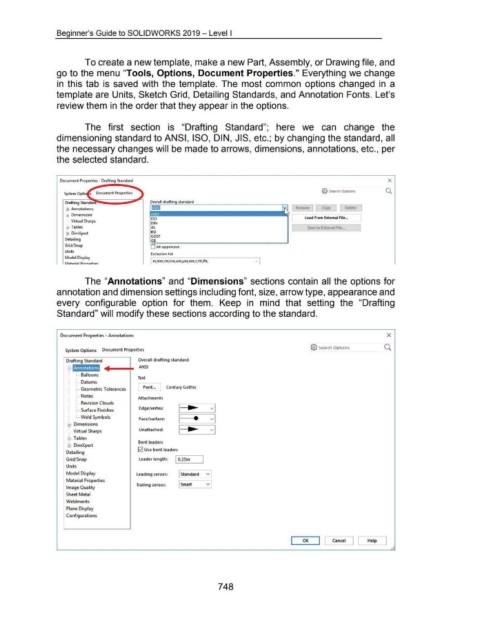
                                                      The  first  section  is  "Drafting  Standard";  here  we  can  change  the


                                    dimensioning standard to ANSI, ISO, DIN, JIS, etc.; by changing the standard, all


                                    the necessary changes will be made to arrows, dimensions, annotations, etc., per


                                    the selected standard.


                                      Document Properties- Drafting Standard                                                                                                                                                                        X


                                                                                                                                                                                                          @ Search Options                        Q.


                                          $·· Annotations
                                          $ .. Dimensions
                                                                                               ISO
                                           :  .... Virtual Sharps
                                                                                               DIN
                                          ~ .. Tables                                          JIS                                                                                               Save to External F1le ..
                                          00· DimXpert                                         BSI
                                                                                               GOST
                                         Detailing
                                         Grid/ Snap                                            0  All uppercase

                                         Units
                                                                                               Exclusion list
                                         Model Display
                                                                                               I   I   I   I   t   ,,..   I   I   I   I
                                                                                                 m·mm·cm·km·um·••m·nmTHz;Pa·


                                                      The "Annotations" and "Dimensions" sections contain all  the options for


                                    annotation and dimension settings including font, size, arrow type, appearance and


                                    every  configurable  option  for  them.  Keep  in  mind  that  setting  the  "Drafting


                                    Standard" will modify these sections according to the standard.


                                       Document Properties - Annotations                                                                                                                                                                           X


                                                                                                                                                                                                   @ Search Options             ___ 0.
                                          System Options  Document Properties


                                          Drafting Standard                            Overall drafting standard

                                           El·  Annotations                             ANSI

                                                [  .... Balloons
                                                                                       Text
                                                [  .... Datums

                                                                                       [font...          Century Gothic
                                                [  .... Geometric Tolerances
                                                [  .... Notes
                                                                                       Attachments
                                                [ .... Revision Clouds
                                                                                        Edge/Vertex:
                                                [·--· 'Surface Finishe.s
                                                L... Weld Symbols                       Face/surface:                     e

                                           ttJ-- Dimensions

                                            [·--· Virtual Sharps                        Unattached:

                                           $ .. Tables
                                                                                       Bent leaders
                                           ffi .. DimXpert
                                                                                       0  Use bent leaders
                                          Detailing

                                          Grid/ Snap                                    leader length:         I 0.25in         I

                                          Units
                                          Model Display                               leading zeroes:  I Standard               ~

                                          Material Properties
                                                                                      Trailing zeroes:            Smart         ~
                                          Image Quality

                                          'Sheet Metal
                                          Weldments

                                          Plane Display

                                          Configurations


                                                                                                                                                                                              OK  I I  Cancel                ]  [      Help


                                                                                                                                         748

