


Page 311 - Excel Progamming Weekend Crash Course
P. 311
r540629 ch22.qxd  9/2/03  9:35 AM  Page 286


                286                                                          Sunday Morning

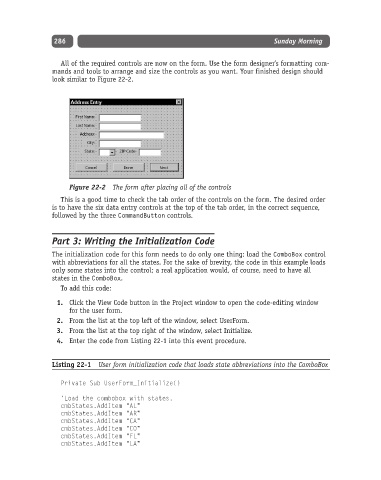
                  All of the required controls are now on the form. Use the form designer’s formatting com-
               mands and tools to arrange and size the controls as you want. Your finished design should
               look similar to Figure 22-2.


                    Figure 22-2 The form after placing all of the controls
                  This is a good time to check the tab order of the controls on the form. The desired order
               is to have the six data entry controls at the top of the tab order, in the correct sequence,
               followed by the three CommandButton controls.


               Part 3: Writing the Initialization Code

               The initialization code for this form needs to do only one thing: load the ComboBox control
               with abbreviations for all the states. For the sake of brevity, the code in this example loads
               only some states into the control; a real application would, of course, need to have all
               states in the ComboBox.
                  To add this code:
                 1. Click the View Code button in the Project window to open the code-editing window
                    for the user form.
                 2. From the list at the top left of the window, select UserForm.
                 3. From the list at the top right of the window, select Initialize.
                 4. Enter the code from Listing 22-1 into this event procedure.


               Listing 22-1  User form initialization code that loads state abbreviations into the ComboBox

                  Private Sub UserForm_Initialize()

                  ‘Load the combobox with states.
                  cmbStates.AddItem “AL”
                  cmbStates.AddItem “AR”
                  cmbStates.AddItem “CA”
                  cmbStates.AddItem “CO”
                  cmbStates.AddItem “FL”
                  cmbStates.AddItem “LA”

