


Page 335 -
P. 335
12  The Declare Service                                         331


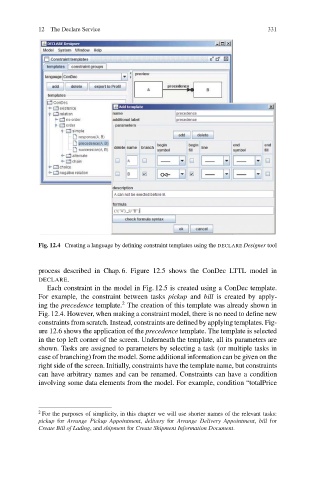
                           Fig. 12.4 Creating a language by defining constraint templates using the DECLARE Designer tool


                           process described in Chap. 6. Figure 12.5 shows the ConDec LTTL model in
                           DECLARE.
                              Each constraint in the model in Fig. 12.5 is created using a ConDec template.
                           For example, the constraint between tasks pickup and bill is created by apply-
                                                   2
                           ing the precedence template. The creation of this template was already shown in
                           Fig. 12.4. However, when making a constraint model, there is no need to define new
                           constraints from scratch. Instead, constraints are defined by applying templates. Fig-
                           ure 12.6 shows the application of the precedence template. The template is selected
                           in the top left corner of the screen. Underneath the template, all its parameters are
                           shown. Tasks are assigned to parameters by selecting a task (or multiple tasks in
                           case of branching) from the model. Some additional information can be given on the
                           right side of the screen. Initially, constraints have the template name, but constraints
                           can have arbitrary names and can be renamed. Constraints can have a condition
                           involving some data elements from the model. For example, condition “totalPrice


                           2
                            For the purposes of simplicity, in this chapter we will use shorter names of the relevant tasks:
                           pickup for Arrange Pickup Appointment, delivery for Arrange Delivery Appointment, bill for
                           Create Bill of Lading,and shipment for Create Shipment Information Document.

