


Page 339 -
P. 339
12  The Declare Service                                         335


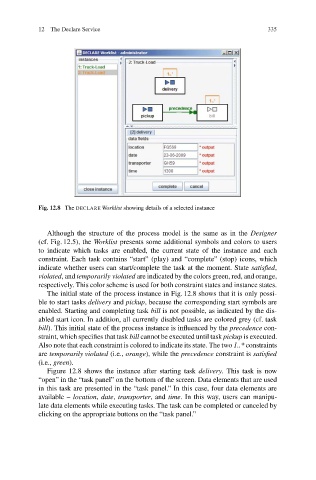
                           Fig. 12.8 The DECLARE Worklist showing details of a selected instance


                              Although the structure of the process model is the same as in the Designer
                           (cf. Fig. 12.5), the Worklist presents some additional symbols and colors to users
                           to indicate which tasks are enabled, the current state of the instance and each
                           constraint. Each task contains “start” (play) and “complete” (stop) icons, which
                           indicate whether users can start/complete the task at the moment. State satisfied,
                           violated,and temporarily violated are indicated by the colors green, red, and orange,
                           respectively. This color scheme is used for both constraint states and instance states.
                              The initial state of the process instance in Fig. 12.8 shows that it is only possi-
                           ble to start tasks delivery and pickup, because the corresponding start symbols are
                           enabled. Starting and completing task bill is not possible, as indicated by the dis-
                           abled start icon. In addition, all currently disabled tasks are colored grey (cf. task
                           bill). This initial state of the process instance is influenced by the precedence con-
                           straint, which specifies that task bill cannot be executed until task pickup is executed.
                           Also note that each constraint is colored to indicate its state. The two 1..* constraints
                           are temporarily violated (i.e., orange), while the precedence constraint is satisfied
                           (i.e., green).
                              Figure 12.8 shows the instance after starting task delivery.This taskis now
                           “open” in the “task panel” on the bottom of the screen. Data elements that are used
                           in this task are presented in the “task panel.” In this case, four data elements are
                           available – location, date, transporter,and time. In this way, users can manipu-
                           late data elements while executing tasks. The task can be completed or canceled by
                           clicking on the appropriate buttons on the “task panel.”

