


Page 351 -
P. 351
318     Part 4  •  the essentials of Design

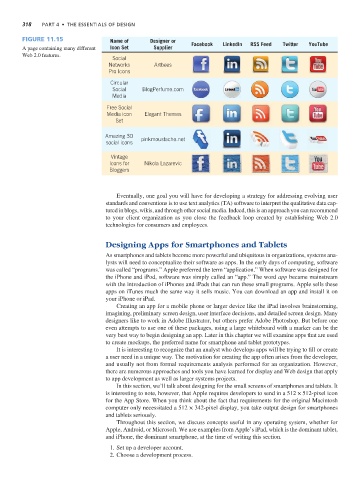
                Figure 11.15                 Name of      Designer or
                A page containing many different   Icon Set  Supplier   Facebook  LinkedIn  RSS Feed  Twitter  YouTube
                Web 2.0 features.
                                              Social
                                             Networks       Artbees
                                             Pro Icons
                                             Circular
                                              Social    BlogPerfume.com
                                              Media
                                            Free Social
                                            Media icon  Elegant Themes
                                               Set

                                           Amazing 3D  pinkmoustache.net
                                            social icons
                                             Vintage
                                             Icons for  Nikola Lazarevic
                                             Bloggers


                                               Eventually, one goal you will have for developing a strategy for addressing evolving user
                                            standards and conventions is to use text analytics (TA) software to interpret the qualitative data cap-
                                            tured in blogs, wikis, and through other social media. Indeed, this is an approach you can recommend
                                            to your client organization as you close the feedback loop created by establishing Web 2.0
                                            technologies for consumers and employees.


                                            Designing Apps for Smartphones and Tablets

                                            As smartphones and tablets become more powerful and ubiquitous in organizations, systems ana-
                                            lysts will need to conceptualize their software as apps. In the early days of computing, software
                                            was called “programs.” Apple preferred the term “application.” When software was designed for
                                            the iPhone and iPod, software was simply called an “app.” The word app became mainstream
                                            with the introduction of iPhones and iPads that can run these small programs. Apple sells these
                                            apps on iTunes much the same way it sells music. You can download an app and install it on
                                            your iPhone or iPad.
                                               Creating an app for a mobile phone or larger device like the iPad involves brainstorming,
                                            imagining, preliminary screen design, user interface decisions, and detailed screen design. Many
                                            designers like to work in Adobe Illustrator, but others prefer Adobe Photoshop. But before one
                                            even attempts to use one of these packages, using a large whiteboard with a marker can be the
                                            very best way to begin designing an app. Later in this chapter we will examine apps that are used
                                            to create mockups, the preferred name for smartphone and tablet prototypes.
                                               It is interesting to recognize that an analyst who develops apps will be trying to fill or create
                                            a user need in a unique way. The motivation for creating the app often arises from the developer,
                                            and usually not from formal requirements analysis performed for an organization. However,
                                            there are numerous approaches and tools you have learned for display and Web design that apply
                                            to app development as well as larger systems projects.
                                               In this section, we’ll talk about designing for the small screens of smartphones and tablets. It
                                            is interesting to note, however, that Apple requires developers to send in a 512 × 512-pixel icon
                                            for the App Store. When you think about the fact that requirements for the original Macintosh
                                            computer only necessitated a 512 × 342-pixel display, you take output design for smartphones
                                            and tablets seriously.
                                               Throughout this section, we discuss concepts useful in any operating system, whether for
                                            Apple, Android, or Microsoft. We use examples from Apple’s iPad, which is the dominant tablet,
                                            and iPhone, the dominant smartphone, at the time of writing this section.
                                              1. Set up a developer account.
                                              2. Choose a development process.

