


Page 339 -
P. 339
manage your data


                        Test Drive


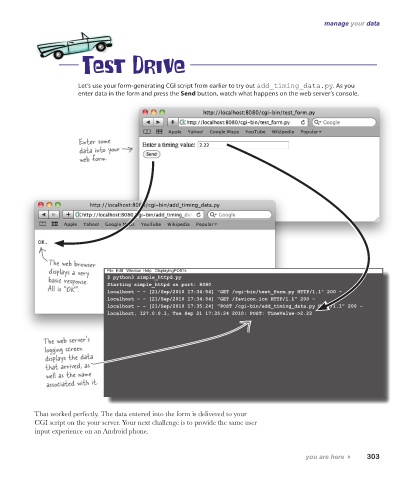
                       Let’s use your form-generating CGI script from earlier to try out add_timing_data.py. As you
                       enter data in the form and press the Send button, watch what happens on the web server’s console.


                       Enter some
                       data into your
                       web form.


              The web browser
               displays a very   File  Edit   Window  Help   DisplayingPOSTs
              basic response.   $ python3 simple_httpd.py
              All is “OK”.     Starting simple_httpd on port: 8080
                               localhost - - [21/Sep/2010 17:34:54] "GET /cgi-bin/test_form.py HTTP/1.1" 200 -
                               localhost - - [21/Sep/2010 17:34:54] "GET /favicon.ico HTTP/1.1" 200 -
                               localhost - - [21/Sep/2010 17:35:24] "POST /cgi-bin/add_timing_data.py HTTP/1.1" 200 -
                               localhost, 127.0.0.1, Tue Sep 21 17:35:24 2010: POST: TimeValue->2.22


             The web server’s
             logging screen
              displays the data
              that arrived, as
              well as the name
              associated with it.


           That worked perfectly. The data entered into the form is delivered to your
           CGI script on the your server. Your next challenge is to provide the same user
           input experience on an Android phone.


                                                                                      you are here 4    303

