


Page 343 -
P. 343
manage your data


                        Test Drive


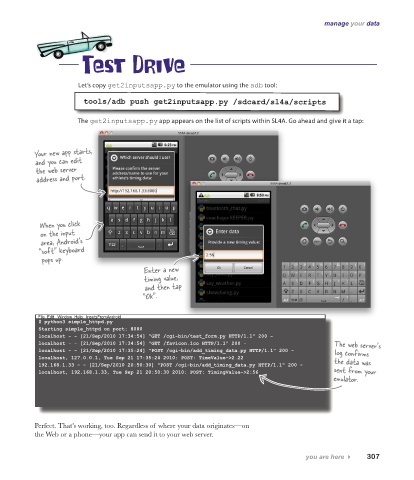
                       Let’s copy get2inputsapp.py to the emulator using the adb tool:

                        tools/adb push get2inputsapp.py /sdcard/sl4a/scripts

                       The get2inputsapp.py app appears on the list of scripts within SL4A. Go ahead and give it a tap:


           Your new app starts,
           and you can edit
           the web server
           address and port.


            When you click
            on the input
            area, Android’s
            “soft” keyboard
             pops up.
                                         Enter a new
                                         timing value,
                                         and then tap
                                         “Ok”.


            File  Edit   Window  Help   InputsFromAndroid
            $ python3 simple_httpd.py
            Starting simple_httpd on port: 8080
            localhost - - [21/Sep/2010 17:34:54] "GET /cgi-bin/test_form.py HTTP/1.1" 200 -
            localhost - - [21/Sep/2010 17:34:54] "GET /favicon.ico HTTP/1.1" 200 -            The web server’s
            localhost - - [21/Sep/2010 17:35:24] "POST /cgi-bin/add_timing_data.py HTTP/1.1" 200 -  log confirms
            localhost, 127.0.0.1, Tue Sep 21 17:35:24 2010: POST: TimeValue->2.22             the data was
            192.168.1.33 - - [21/Sep/2010 20:50:30] "POST /cgi-bin/add_timing_data.py HTTP/1.1" 200 -
            localhost, 192.168.1.33, Tue Sep 21 20:50:30 2010: POST: TimingValue->2:56        sent from your
                                                                                              emulator.


           Perfect. That’s working, too. Regardless of where your data originates—on
           the Web or a phone—your app can send it to your web server.

                                                                                      you are here 4    307

