


Page 342 -
P. 342
user interaction


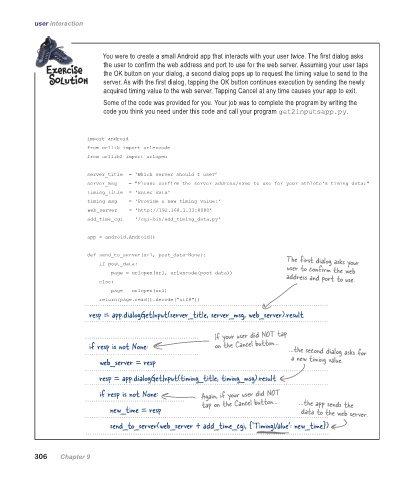
                              You were to create a small Android app that interacts with your user twice. The first dialog asks
                              the user to confirm the web address and port to use for the web server. Assuming your user taps
                              the OK button on your dialog, a second dialog pops up to request the timing value to send to the
                              server. As with the first dialog, tapping the OK button continues execution by sending the newly
                              acquired timing value to the web server. Tapping Cancel at any time causes your app to exit.
                              Some of the code was provided for you. Your job was to complete the program by writing the
                              code you think you need under this code and call your program get2inputsapp.py.


                         import android
                         from urllib import urlencode
                         from urllib2 import urlopen

                         server_title  = 'Which server should I use?’
                         server_msg    = "Please confirm the server address/name to use for your athlete's timing data:"
                         timing_title  = 'Enter data'
                         timing_msg    = 'Provide a new timing value:'
                         web_server    = 'http://192.168.1.33:8080'
                         add_time_cgi  = '/cgi-bin/add_timing_data.py'

                         app = android.Android()

                         def send_to_server(url, post_data=None):
                                                                                 The first dialog asks your
                             if post_data:
                                                                                 user to confirm the web
                                 page = urlopen(url, urlencode(post_data))
                                                                                 address and port to use.
                             else:
                                 page = urlopen(url)
                             return(page.read().decode("utf8"))
                          resp = app.dialogGetInput(server_title, server_msg, web_server).result


                                                             If your user did NOT tap
                          if resp is not None:               on the Cancel button…  …the second dialog asks for

                              web_server = resp                                   a new timing value.
                              resp = app.dialogGetInput(timing_title, timing_msg).result

                              if resp is not None:       Again, if your user did NOT

                                  new_time = resp        tap on the Cancel button…  …the app sends the
                                                                                     data to the web server.
                                  send_to_server(web_server + add_time_cgi, {‘TimingValue’: new_time})


           306    Chapter 9

