


Page 340 -
P. 340
android data entry


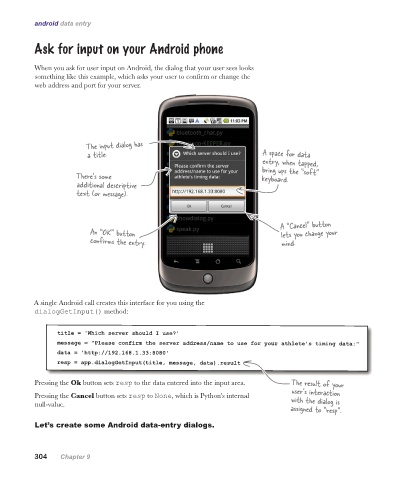
           Ask for input on your Android phone


           When you ask for user input on Android, the dialog that your user sees looks
           something like this example, which asks your user to confirm or change the
           web address and port for your server.


                         The input dialog has
                         a title.                                         A space for data
                                                                          entry, when tapped,
                                                                          bring ups the “soft”
                      There’s some                                        keyboard.
                      additional descriptive
                      text (or message).


                                                                               A “Cancel” button
                          An “OK” button                                       lets you change your
                          confirms the entry.                                  mind.


          A single Android call creates this interface for you using the
           dialogGetInput() method:


                 title = 'Which server should I use?'
                 message = "Please confirm the server address/name to use for your athlete's timing data:"
                 data = 'http://192.168.1.33:8080'
                 resp = app.dialogGetInput(title, message, data).result


           Pressing the Ok button sets resp to the data entered into the input area.  The result of your
                                                                                  user’s interaction
           Pressing the Cancel button sets resp to None, which is Python’s internal   with the dialog is
           null-value.
                                                                                  assigned to “resp”.

           Let’s create some Android data-entry dialogs.


           304    Chapter 9

