


Page 524 - Microsoft Office Excel 2003 Programming Inside Out
P. 524
Microsoft Office Excel 2003 Programming Inside Out
On the CD The complete source code for the Excel Query program can be found on the
Companion CD in ExcelQuery.xls.
Setting Up the Project
Most of the code for this project is stored in the ThisWorkbook module. Two user forms are
also used, DBInfo and DBQuery. The ThisWorkbook module is automatically created when
the workbook is created. The user forms can be added to the project by choosing Insert,
UserForm from the main menu and modifying the name of the user form in the Properties
pane.
At the beginning of each module, you should add the following lines of code. The first state
ment forces you to declare variables before you use them, which helps to prevent typing
errors. The second statement instructs Visual Basic to perform all string comparisons in a
case-insensitive manner, which reduces the amount of code you need to write when compar
ing strings.
Option Explicit
Option Compare Text
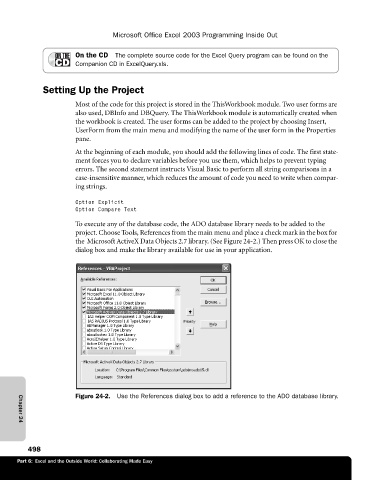
To execute any of the database code, the ADO database library needs to be added to the
project. Choose Tools, References from the main menu and place a check mark in the box for
the Microsoft ActiveX Data Objects 2.7 library. (See Figure 24-2.) Then press OK to close the
dialog box and make the library available for use in your application.
Figure 24-2. Use the References dialog box to add a reference to the ADO database library.
Chapter 24
498
Part 6: Excel and the Outside World: Collaborating Made Easy

