


Page 326 -
P. 326
322                                                        M. Adams
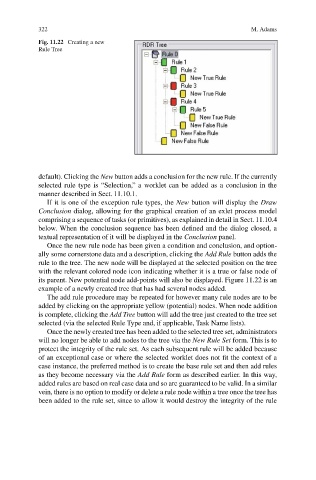
                           Fig. 11.22 Creating a new
                           Rule Tree


                           default). Clicking the New button adds a conclusion for the new rule. If the currently
                           selected rule type is “Selection,” a worklet can be added as a conclusion in the
                           manner described in Sect. 11.10.1.
                              If it is one of the exception rule types, the New button will display the Draw
                           Conclusion dialog, allowing for the graphical creation of an exlet process model
                           comprising a sequence of tasks (or primitives), as explained in detail in Sect. 11.10.4
                           below. When the conclusion sequence has been defined and the dialog closed, a
                           textual representation of it will be displayed in the Conclusion panel.
                              Once the new rule node has been given a condition and conclusion, and option-
                           ally some cornerstone data and a description, clicking the Add Rule button adds the
                           rule to the tree. The new node will be displayed at the selected position on the tree
                           with the relevant colored node icon indicating whether it is a true or false node of
                           its parent. New potential node add-points will also be displayed. Figure 11.22 is an
                           example of a newly created tree that has had several nodes added.
                              The add rule procedure may be repeated for however many rule nodes are to be
                           added by clicking on the appropriate yellow (potential) nodes. When node addition
                           is complete, clicking the Add Tree button will add the tree just created to the tree set
                           selected (via the selected Rule Type and, if applicable, Task Name lists).
                              Once the newly created tree has been added to the selected tree set, administrators
                           will no longer be able to add nodes to the tree via the New Rule Set form. This is to
                           protect the integrity of the rule set. As each subsequent rule will be added because
                           of an exceptional case or where the selected worklet does not fit the context of a
                           case instance, the preferred method is to create the base rule set and then add rules
                           as they become necessary via the Add Rule form as described earlier. In this way,
                           added rules are based on real case data and so are guaranteed to be valid. In a similar
                           vein, there is no option to modify or delete a rule node within a tree once the tree has
                           been added to the rule set, since to allow it would destroy the integrity of the rule

