


Page 323 -
P. 323
11  The Worklet Service                                         319


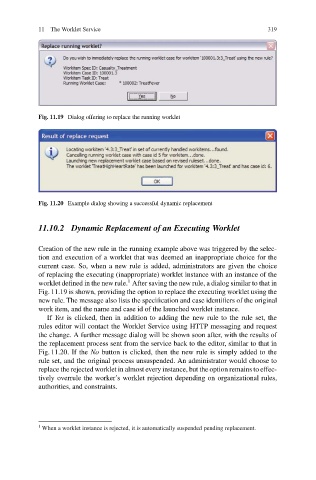
                           Fig. 11.19 Dialog offering to replace the running worklet


                           Fig. 11.20 Example dialog showing a successful dynamic replacement


                           11.10.2 Dynamic Replacement of an Executing Worklet


                           Creation of the new rule in the running example above was triggered by the selec-
                           tion and execution of a worklet that was deemed an inappropriate choice for the
                           current case. So, when a new rule is added, administrators are given the choice
                           of replacing the executing (inappropriate) worklet instance with an instance of the
                                                    1
                           worklet defined in the new rule. After saving the new rule, a dialog similar to that in
                           Fig. 11.19 is shown, providing the option to replace the executing worklet using the
                           new rule. The message also lists the specification and case identifiers of the original
                           work item, and the name and case id of the launched worklet instance.
                              If Yes is clicked, then in addition to adding the new rule to the rule set, the
                           rules editor will contact the Worklet Service using HTTP messaging and request
                           the change. A further message dialog will be shown soon after, with the results of
                           the replacement process sent from the service back to the editor, similar to that in
                           Fig. 11.20. If the No button is clicked, then the new rule is simply added to the
                           rule set, and the original process unsuspended. An administrator would choose to
                           replace the rejected worklet in almost every instance, but the option remains to effec-
                           tively overrule the worker’s worklet rejection depending on organizational rules,
                           authorities, and constraints.


                           1  When a worklet instance is rejected, it is automatically suspended pending replacement.

