


Page 137 -
P. 137
5.7  Overall survey structure  123


                  questions may require knowledge or details presented in other survey questions, it is
                  generally hard to randomize the order of questions (Babbie, 1990). Rather, provide
                  interesting questions at the beginning of the survey, to help motivate people to read
                  the survey and complete it. Generally, it is a good idea to leave demographic ques-
                  tions until the end of the survey, as these are the least interesting (Babbie, 1990).
                  Also, if there are any sensitive or potentially objectionable questions (relating to
                  income, health, or similar topics), then they should be placed near the end, once the
                  respondent has already become interested in the survey (Dillman, 2000). Note that
                  survey length is an important consideration. While you want to include as many
                  questions as possible on the survey, at some point, a survey becomes too long for
                  many people to complete, and very long surveys can lead to very low response rates.
                  Try to ask all of the questions that you need, but be reasonable when it comes to the
                  amount of time that individuals need to set aside to respond to the survey.
                     The easiest type of survey is when all respondents should answer all questions. But
                  frequently some questions do not apply to all respondents. For instance, imagine that
                  you are running a survey to learn more about the e-mail usage habits of users over the
                  age of 65. You may ask if they use a specific e-mail application (and you will need to
                  be clear about the version of the application, and whether it is desktop, web-based,
                  or smartphone-based). If the answer is “yes,” you may want them to answer a set of
                  additional questions; if the answer is “no,” you want them to skip to the next set of
                  questions. This is sometimes called a “contingent question” (Babbie, 1990) because
                  the respondent's need to respond to the second question is contingent on their response
                  to the first question. This can be cause for confusion: if the directions and layout are
                  not clear enough, a respondent who does not use Microsoft Office 365 may start read-
                  ing questions  relating to Microsoft Office 365 usage and be unsure of how to respond.
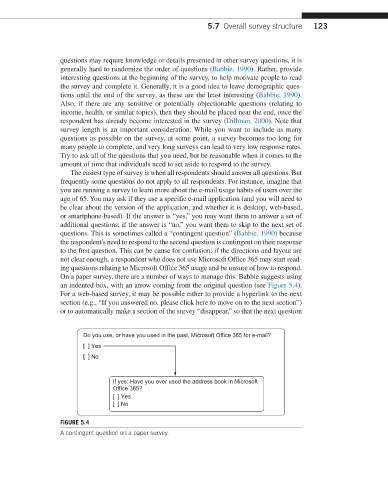
                  On a paper survey, there are a number of ways to manage this. Babbie suggests using
                  an indented box, with an arrow coming from the original question (see Figure 5.4).
                  For a web-based survey, it may be possible either to provide a hyperlink to the next
                  section (e.g., “If you answered no, please click here to move on to the next section”)
                  or to  automatically make a section of the survey “disappear,” so that the next question


                        Do you use, or have you used in the past, Microsoft Office 365 for e-mail?
                        [  ] Yes
                        [  ] No


                                If yes: Have you ever used the address book in Microsoft
                                Office 365?
                                [  ] Yes
                                [  ] No

                  FIGURE 5.4
                  A contingent question on a paper survey.

