


Page 209 - Separation process engineering
P. 209
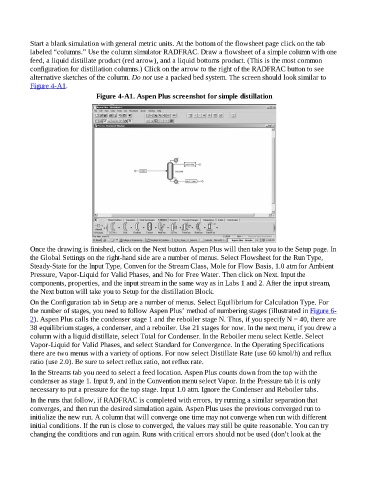
Start a blank simulation with general metric units. At the bottom of the flowsheet page click on the tab
                    labeled “columns.” Use the column simulator RADFRAC. Draw a flowsheet of a simple column with one
                    feed, a liquid distillate product (red arrow), and a liquid bottoms product. (This is the most common
                    configuration for distillation columns.) Click on the arrow to the right of the RADFRAC button to see
                    alternative sketches of the column. Do not use a packed bed system. The screen should look similar to
                    Figure 4-A1.

                                              Figure 4-A1. Aspen Plus screenshot for simple distillation


                    Once the drawing is finished, click on the Next button. Aspen Plus will then take you to the Setup page. In
                    the Global Settings on the right-hand side are a number of menus. Select Flowsheet for the Run Type,
                    Steady-State for the Input Type, Conven for the Stream Class, Mole for Flow Basis, 1.0 atm for Ambient
                    Pressure, Vapor-Liquid for Valid Phases, and No for Free Water. Then click on Next. Input the
                    components, properties, and the input stream in the same way as in Labs 1 and 2. After the input stream,
                    the Next button will take you to Setup for the distillation Block.

                    On the Configuration tab in Setup are a number of menus. Select Equilibrium for Calculation Type. For
                    the number of stages, you need to follow Aspen Plus’ method of numbering stages (illustrated in Figure 6-
                    2). Aspen Plus calls the condenser stage 1 and the reboiler stage N. Thus, if you specify N = 40, there are
                    38 equilibrium stages, a condenser, and a reboiler. Use 21 stages for now. In the next menu, if you drew a
                    column with a liquid distillate, select Total for Condenser. In the Reboiler menu select Kettle. Select
                    Vapor-Liquid for Valid Phases, and select Standard for Convergence. In the Operating Specifications
                    there are two menus with a variety of options. For now select Distillate Rate (use 60 kmol/h) and reflux

                    ratio (use 2.0). Be sure to select reflux ratio, not reflux rate.
                    In the Streams tab you need to select a feed location. Aspen Plus counts down from the top with the
                    condenser as stage 1. Input 9, and in the Convention menu select Vapor. In the Pressure tab it is only
                    necessary to put a pressure for the top stage. Input 1.0 atm. Ignore the Condenser and Reboiler tabs.

                    In the runs that follow, if RADFRAC is completed with errors, try running a similar separation that
                    converges, and then run the desired simulation again. Aspen Plus uses the previous converged run to
                    initialize the new run. A column that will converge one time may not converge when run with different
                    initial conditions. If the run is close to converged, the values may still be quite reasonable. You can try
                    changing the conditions and run again. Runs with critical errors should not be used (don’t look at the

