


Page 351 -
P. 351
322           PART THREE  CONVENTIONAL METHODS FOR SOFTWARE ENGINEERING


         FIGURE 12.20
                                                                          Control
         Context-level    Control    User commands         Display         panel
         DFD for          panel         and data          information     display
         SafeHome
                                                                Alarm
                                                                type
                                                 SafeHome                  Alarm
                                                 software


                                       Sensor              Telephone     Telephone
                         Sensors        status            number tones      line


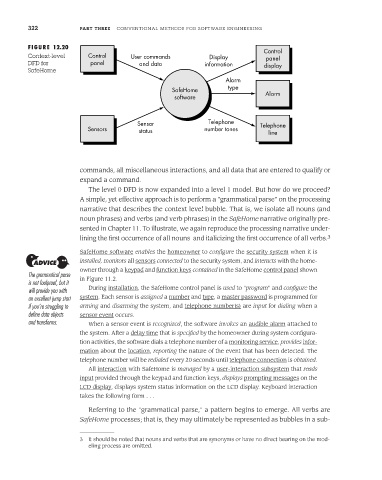
                       commands, all miscellaneous interactions, and all data that are entered to qualify or
                       expand a command.
                          The level 0 DFD is now expanded into a level 1 model. But how do we proceed?
                       A simple, yet effective approach is to perform a "grammatical parse" on the processing
                       narrative that describes the context level bubble. That is, we isolate all nouns (and
                       noun phrases) and verbs (and verb phrases) in the SafeHome narrative originally pre-
                       sented in Chapter 11. To illustrate, we again reproduce the processing narrative under-
                       lining the first occurrence of all nouns  and italicizing the first occurrence of all verbs. 3
                       SafeHome software enables the homeowner to configure the security system when it is
                       installed, monitors all sensors connected to the security system, and interacts with the home-
                       owner through a keypad and function keys contained in the SafeHome control panel shown
         The grammatical parse  in Figure 11.2.
         is not foolproof, but it
         will provide you with  During installation, the SafeHome control panel is used to "program" and configure the
         an excellent jump start  system. Each sensor is assigned a number and type, a master password is programmed for
         if you’re struggling to  arming and disarming the system, and telephone number(s) are input for dialing when a
         define data objects  sensor event occurs.
         and transforms.  When a sensor event is recognized, the software invokes an audible alarm attached to
                       the system. After a delay time that is specified by the homeowner during system configura-
                       tion activities, the software dials a telephone number of a monitoring service, provides infor-
                       mation about the location, reporting the nature of the event that has been detected. The
                       telephone number will be redialed every 20 seconds until telephone connection is obtained.
                          All interaction with SafeHome is managed by a user-interaction subsystem that reads
                       input provided through the keypad and function keys, displays prompting messages on the
                       LCD display, displays system status information on the LCD display. Keyboard interaction
                       takes the following form . . .

                          Referring to the "grammatical parse," a pattern begins to emerge. All verbs are
                       SafeHome processes; that is, they may ultimately be represented as bubbles in a sub-


                       3  It should be noted that nouns and verbs that are synonyms or have no direct bearing on the mod-
                          eling process are omitted.

