


Page 347 -
P. 347
318           PART THREE  CONVENTIONAL METHODS FOR SOFTWARE ENGINEERING


         FIGURE 12.17
                                                                            Idle
         State transition          Full and start                     Invoke read-op-input
         diagram for           Invoke manage-copying
         photocopier                                   Reading
         software                                     commands

                                              Copies done                  Full
                                            Invoke read-op-input     Invoke read-op-input


                                Making copies                          Reloading paper
                                                       Empty
                                                  Invoke reload paper

                                   Jammed
                          Invoke perform problem-diagnosis
                                                                       Not jammed
                                                     Diagnosing      Invoke read-op-input
                                                       problem


                          Control flows are shown entering and exiting individual processes and the verti-
                       cal bar representing the CSPEC "window." For example, the paper feed status and
                       start/stop events flow into the CSPEC bar. This implies that each of these events
                       will cause some process represented in the CFD to be activated. If we were to exam-
                       ine the CSPEC internals, the start/stop event would be shown to activate/deacti-
                       vate the manage copying process. Similarly, the jammed event (part of paper feed
                       status) would activate perform problem diagnosis. It should be noted that all vertical
                       bars within the CFD refer to the same CSPEC. An event flow can be input directly into
                       a process as shown with repro fault. However, this flow does not activate the process
                       but rather provides control information for the process algorithm.
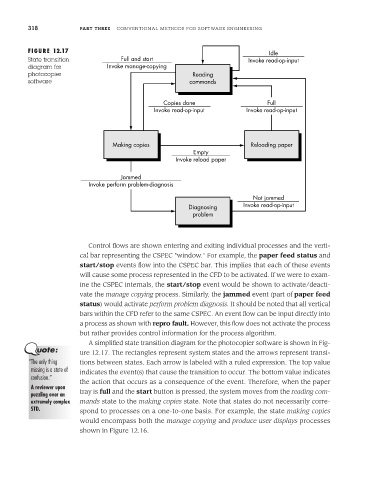
                          A simplified state transition diagram for the photocopier software is shown in Fig-
                       ure 12.17. The rectangles represent system states and the arrows represent transi-
         “The only thing  tions between states. Each arrow is labeled with a ruled expression. The top value
          missing is a state of  indicates the event(s) that cause the transition to occur. The bottom value indicates
          confusion.”
                       the action that occurs as a consequence of the event. Therefore, when the paper
          A reviewer upon
          puzzling over an  tray is full and the start button is pressed, the system moves from the reading com-
          extremely complex  mands state to the making copies state. Note that states do not necessarily corre-
          STD.         spond to processes on a one-to-one basis. For example, the state making copies
                       would encompass both the manage copying and produce user displays processes
                       shown in Figure 12.16.

