


Page 612 -
P. 612
592   CHAPTER 13 DECISION ANALYSIS


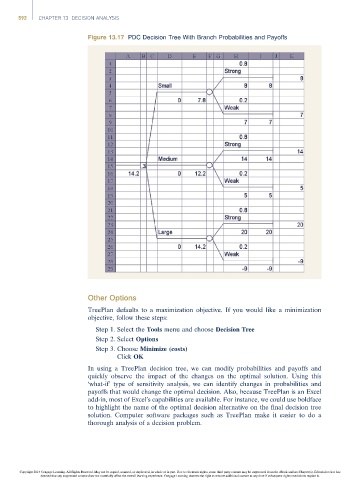
                                     Figure 13.17 PDC Decision Tree With Branch Probabilities and Payoffs


                                     Other Options
                                     TreePlan defaults to a maximization objective. If you would like a minimization
                                     objective, follow these steps:
                                       Step 1. Select the Tools menu and choose Decision Tree
                                       Step 2. Select Options
                                       Step 3. Choose Minimize (costs)
                                              Click OK

                                     In using a TreePlan decision tree, we can modify probabilities and payoffs and
                                     quickly observe the impact of the changes on the optimal solution. Using this
                                     ‘what-if’ type of sensitivity analysis, we can identify changes in probabilities and
                                     payoffs that would change the optimal decision. Also, because TreePlan is an Excel
                                     add-in, most of Excel’s capabilities are available. For instance, we could use boldface
                                     to highlight the name of the optimal decision alternative on the final decision tree
                                     solution. Computer software packages such as TreePlan make it easier to do a
                                     thorough analysis of a decision problem.


                Copyright 2014 Cengage Learning. All Rights Reserved. May not be copied, scanned, or duplicated, in whole or in part. Due to electronic rights, some third party content may be suppressed from the eBook and/or eChapter(s). Editorial review has
                      deemed that any suppressed content does not materially affect the overall learning experience. Cengage Learning reserves the right to remove additional content at any time if subsequent rights restrictions require it.

