


Page 610 -
P. 610
590   CHAPTER 13 DECISION ANALYSIS


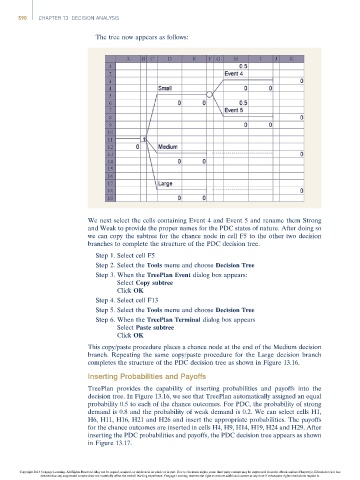
                                       The tree now appears as follows:


                                     We next select the cells containing Event 4 and Event 5 and rename them Strong
                                     and Weak to provide the proper names for the PDC states of nature. After doing so
                                     we can copy the subtree for the chance node in cell F5 to the other two decision
                                     branches to complete the structure of the PDC decision tree.
                                       Step 1. Select cell F5
                                       Step 2. Select the Tools menu and choose Decision Tree
                                       Step 3. When the TreePlan Event dialog box appears:
                                              Select Copy subtree
                                              Click OK
                                       Step 4. Select cell F13
                                       Step 5. Select the Tools menu and choose Decision Tree
                                       Step 6. When the TreePlan Terminal dialog box appears
                                              Select Paste subtree
                                              Click OK
                                     This copy/paste procedure places a chance node at the end of the Medium decision
                                     branch. Repeating the same copy/paste procedure for the Large decision branch
                                     completes the structure of the PDC decision tree as shown in Figure 13.16.

                                     Inserting Probabilities and Payoffs
                                     TreePlan provides the capability of inserting probabilities and payoffs into the
                                     decision tree. In Figure 13.16, we see that TreePlan automatically assigned an equal
                                     probability 0.5 to each of the chance outcomes. For PDC, the probability of strong
                                     demand is 0.8 and the probability of weak demand is 0.2. We can select cells H1,
                                     H6, H11, H16, H21 and H26 and insert the appropriate probabilities. The payoffs
                                     for the chance outcomes are inserted in cells H4, H9, H14, H19, H24 and H29. After
                                     inserting the PDC probabilities and payoffs, the PDC decision tree appears as shown
                                     in Figure 13.17.


                Copyright 2014 Cengage Learning. All Rights Reserved. May not be copied, scanned, or duplicated, in whole or in part. Due to electronic rights, some third party content may be suppressed from the eBook and/or eChapter(s). Editorial review has
                      deemed that any suppressed content does not materially affect the overall learning experience. Cengage Learning reserves the right to remove additional content at any time if subsequent rights restrictions require it.

