


Page 608 -
P. 608
588   CHAPTER 13 DECISION ANALYSIS


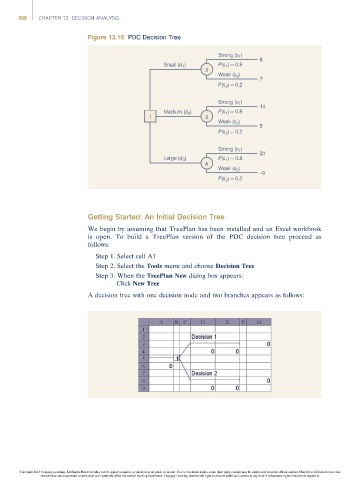
                                     Figure 13.15 PDC Decision Tree

                                                                             Strong (s )  8
                                                                                   1
                                                            Small (d )       P(s 1 ) = 0.8
                                                                  1
                                                                         2
                                                                             Weak (s 2 )
                                                                                         7
                                                                             P(s 2 ) = 0.2
                                                                             Strong (s )  14
                                                                                   1
                                                            Medium (d )      P(s ) = 0.8
                                                                   2
                                                                               1
                                                       1                 3
                                                                             Weak (s 2 )
                                                                                         5
                                                                             P(s 2 ) = 0.2
                                                                             Strong (s )  20
                                                                                   1
                                                            Large (d 3 )     P(s ) = 0.8
                                                                               1
                                                                         4
                                                                             Weak (s 2 )
                                                                                         –9
                                                                             P(s 2 ) = 0.2


                                     Getting Started: An Initial Decision Tree

                                     We begin by assuming that TreePlan has been installed and an Excel workbook
                                     is open. To build a TreePlan version of the PDC decision tree proceed as
                                     follows:
                                       Step 1. Select cell A1
                                       Step 2. Select the Tools menu and choose Decision Tree
                                       Step 3. When the TreePlan New dialog box appears:
                                             Click New Tree

                                     A decision tree with one decision node and two branches appears as follows:


                Copyright 2014 Cengage Learning. All Rights Reserved. May not be copied, scanned, or duplicated, in whole or in part. Due to electronic rights, some third party content may be suppressed from the eBook and/or eChapter(s). Editorial review has
                      deemed that any suppressed content does not materially affect the overall learning experience. Cengage Learning reserves the right to remove additional content at any time if subsequent rights restrictions require it.

