


Page 524 - 02. Subyek Computer Aided Design - Beginner’s Guide to SOLIDWORKS 2019- Level 1 by Alejandro Reyes
P. 524
Assembly Modeling


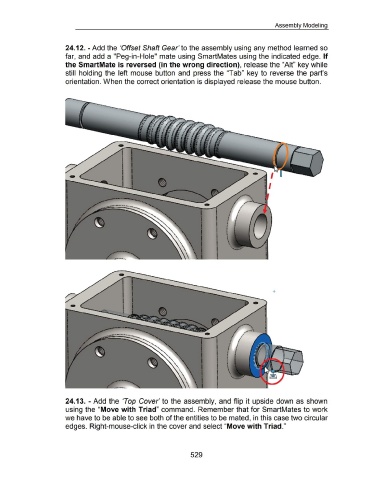
                                                      24.12.- Add the 'Offset Shaft Gear' to the assembly using any method learned so


                                                      far,  and add a "Peg-in-Hole" mate using SmartMates using the indicated edge. If


                                                      the SmartMate is reversed (in the wrong direction), release the "Ait" key while


                                                      still  holding the  left mouse  button  and  press the  "Tab"  key to  reverse  the  part's


                                                      orientation. When the correct orientation is displayed release the mouse button.


                                                      24.13.  - Add the  'Top  Cover' to the assembly,  and flip  it upside down  as shown


                                                      using the "Move with Triad" command.  Remember that for SmartMates to work


                                                      we have to be able to see both of the entities to be mated, in this case two circular


                                                      edges. Right-mouse-click in the cover and select "Move with Triad."


                                                                                                                                                           529

