


Page 527 - 02. Subyek Computer Aided Design - Beginner’s Guide to SOLIDWORKS 2019- Level 1 by Alejandro Reyes
P. 527
Beginner's Guide to SOLIDWORKS 2019- Level I


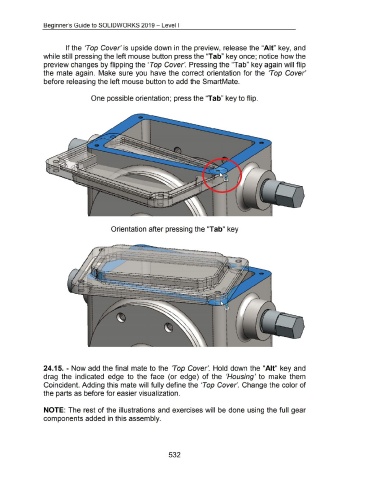
                                                      If the 'Top  Cover' is upside down in the preview, release the "Ait" key, and


                                    while still pressing the left mouse button press the "Tab" key once; notice how the


                                    preview changes by flipping the 'Top Cover'.  Pressing the "Tab" key again will flip


                                    the  mate again.  Make  sure you  have the correct orientation  for the  'Top  Cover'


                                    before releasing the left mouse button to add the SmartMate.


                                                                           One possible orientation; press the "Tab" key to flip.


                                                                                           Orientation after pressing the "Tab" key


                                                                                                                                                                                                           ,.


                                                                                                                                                                                                        I
                                                                                                                                                                                                       I
                                                                                                                                                                                                      .
                                                                                                                                                                                                      •
                                                                                                                                                                                                      •


                                    24.15. - Now add the final  mate to the  'Top  Cover'.  Hold  down the "Ait"  key and


                                    drag  the  indicated  edge  to  the  face  (or  edge)  of the  'Housing' to  make  them


                                    Coincident. Adding this mate will fully define the 'Top Cover'. Change the color of


                                    the parts as before for easier visualization.


                                    NOTE: The rest of the illustrations and exercises will  be done using the full gear


                                    components added in this assembly.


                                                                                                                                         532

