


Page 530 - 02. Subyek Computer Aided Design - Beginner’s Guide to SOLIDWORKS 2019- Level 1 by Alejandro Reyes
P. 530
Assembly Modeling
Fasteners
The commercial versions of SOLIDWORKS Professional and Premium, as
well as the Educational Edition available to schools, include a hardware library
called "SOLIDWORKS Toolbox" which includes nuts, bolts, screws, pins, washers,
bearings, bushings, structural steel, gears, etc. in both metric and imperial unit
standards.
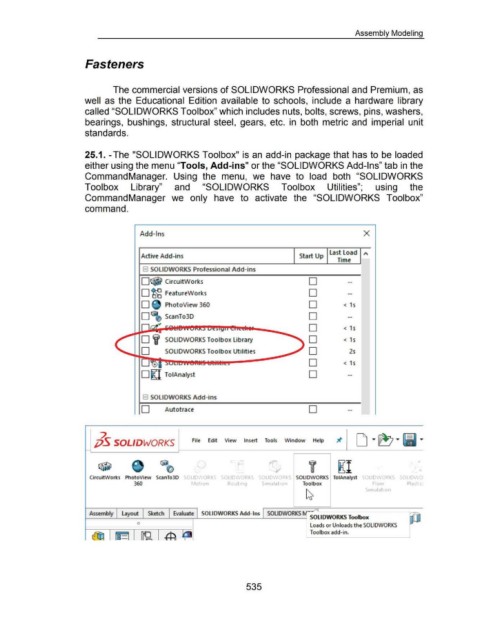
25.1. -The "SOLIDWORKS Toolbox" is an add-in package that has to be loaded
either using the menu "Tools, Add-ins" or the "SOLIDWORKS Add-Ins" tab in the
CommandManager. Using the menu, we have to load both "SOLIDWORKS
Toolbox Library" and "SOLIDWORKS Toolbox Utilities"; using the
CommandManager we only have to activate the "SOLIDWORKS Toolbox"
command.
Add-Ins X
Active Add-ins Start Up Last Load "
Time
8 SOLIDWORK.S Professional Add-ins
D~ CircuitWorks D
D ~ FeatureWorks D
D PhotoView 360 D < 1s
D ScanTo3D D
D < 1 s
D 'if SOLIDWORKS Toolbox Library D < 1 s
.........._~0~- SOLIDWORKS Toolbox Utilities D 2s
D < 1 s
D~ ToiAnalyst D
R SOLIDWORK.S Add -ins
D Autotrace D
2
jjS SOLIDWORKS File Edit View Insert Tools Window Help
f I ~I
CircuitWorl<s PhotoView ScanTo30 OLIO ORKS SOLID ORK SOLIDWORKS ToiAnalyst SOLID ORKS SOLID 0
360 t ot1on Routmg S1mulat1on Toolbox Flow PlastiC!
S1mulat1on
Assembly Layout Sketch Evaluate SOLIDWORKS Add-Ins SOLIDWORKS f\.rSOLIDWORKS Toolbox
0
Loads or Unloads the SOLIDWORKS
Toolbox add-in.
535

