


Page 533 - 02. Subyek Computer Aided Design - Beginner’s Guide to SOLIDWORKS 2019- Level 1 by Alejandro Reyes
P. 533
Beginner's Guide to SOLIDWORKS 2019- Level I
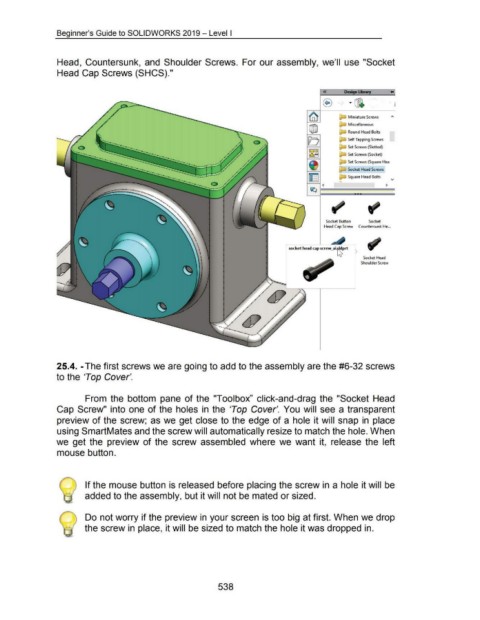
Head, Countersunk, and Shoulder Screws. For our assembly, we'll use "Socket
Head Cap Screws (SHCS)."
«
· @'
Miniature Screws "'
Miscellaneous
Round Head Bolts
Self Tapping Screws
a·- .....
. . .... . ..
-··-.... -..... Set Screws (Slotted)
··~ Set Screws (Socket)
··-...
-··-.. ............
Set Screws (Square Hea
Socket Head Screws
Square Head Bolts v
•
<
Socket Button Socket
Head Cap Screw Countersunk He ...
socket head cap screw_ai~rt 1
r Socket Head
Shoulder Screw
25.4. -The first screws we are going to add to the assembly are the #6-32 screws
to the 'Top Cover'.
From the bottom pane of the "Toolbox" click-and-drag the "Socket Head
Cap Screw" into one of the holes in the 'Top Cover'. You will see a transparent
preview of the screw; as we get close to the edge of a hole it will snap in place
using SmartMates and the screw will automatically resize to match the hole. When
we get the preview of the screw assembled where we want it, release the left
mouse button.
If the mouse button is released before placing the screw in a hole it will be
added to the assembly, but it will not be mated or sized.
Do not worry if the preview in your screen is too big at first. When we drop
the screw in place, it will be sized to match the hole it was dropped in.
538

