


Page 534 - 02. Subyek Computer Aided Design - Beginner’s Guide to SOLIDWORKS 2019- Level 1 by Alejandro Reyes
P. 534
Assembly Modeling
··-... -.... ....
··-...
-·-- ·-...... ....
....
-... _
··-.
. ._.. ...
.... ....
-··-.... -.... ._..
··-... -....... ....
··-... -.... _
..
-.......
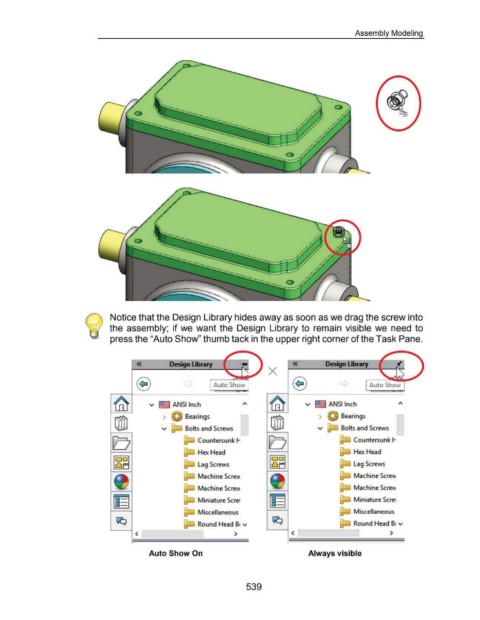
Notice that the Design Library hides away as soon as we drag the screw into
the assembly; if we want the Design Library to remain visible we need to
press the "Auto Show" thumb tack in the upper right corner of the Task Pane.
« « Dedgn......,
X
Auto Show
v ~ ANSI Inch v ~ ANSI Inch
> Bearings > ., Bearings
v Bolts and Screws v Bolts and Screws
Countersunk 1- Countersunk 1-
1"'1-UW Hex Head Hex Head
1"'1-UW Lag Screws ~ Lag Screws
Machine ScreY\ Machine Sere\\
Machine Sere\\ Machine Sere\\
Miniature Scret Miniature Scre1
Miscellaneous Miscellaneous
Round Head B• v Round Head B• v
< > < >
Auto Show On Always visible
539

