


Page 531 - 02. Subyek Computer Aided Design - Beginner’s Guide to SOLIDWORKS 2019- Level 1 by Alejandro Reyes
P. 531
Beginner's Guide to SOLIDWORKS 2019- Level I


                                                      Using "SOLIDWORKS Toolbox" we can add hardware to our assemblies by


                                    dragging and dropping components, and SOLIDWORKS will automatically add the


                                    necessary mates, saving us time. To make it even more powerful and versatile, it


                                    can also be configured to add our own hardware.


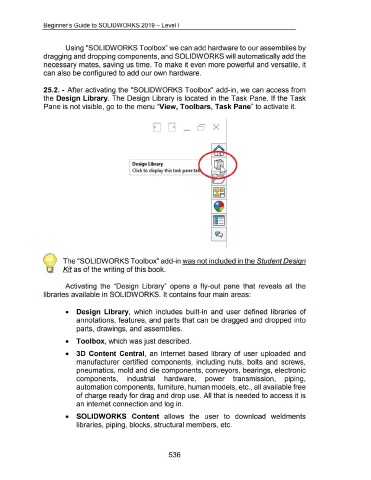
                                    25.2.- After activating the "SOLIDWORKS Toolbox" add-in, we can access from


                                    the  Design  Library.  The Design  Library is located in  the Task Pane.  If the Task


                                    Pane is not visible, go to the menu "View, Toolbars, Task Pane" to activate it.


                                                                                                            Design Library

                                                                                                            Click to display this task pane ta


                                                    The "SOLIDWORKS Toolbox" add-in was not included in the Student Design


                                                    Kit as of the writing of this book.


                                                      Activating  the  "Design  Library"  opens  a  fly-out  pane  that  reveals  all  the


                                    libraries available in SOLIDWORKS. It contains four main areas:


                                                      •  Design  Library,  which  includes  built-in  and  user defined  libraries  of


                                                               annotations, features, and  parts that can be dragged and  dropped into


                                                               parts, drawings, and assemblies.


                                                      •  Toolbox, which was just described.


                                                      •  3D  Content  Central,  an  internet  based  library  of user uploaded  and


                                                               manufacturer certified  components,  including  nuts,  bolts  and  screws,


                                                               pneumatics, mold and die components, conveyors, bearings, electronic


                                                               components,                             industrial                     hardware,                        power  transmission,                                            piping,


                                                               automation components, furniture, human models, etc., all available free


                                                               of charge ready for drag and drop use. All that is needed to access it is


                                                               an internet connection and log in.


                                                      •  SOLIDWORKS  Content  allows  the  user  to  download  weldments


                                                               libraries, piping, blocks, structural members, etc.


                                                                                                                                         536

