


Page 535 - 02. Subyek Computer Aided Design - Beginner’s Guide to SOLIDWORKS 2019- Level 1 by Alejandro Reyes
P. 535
Beginner's Guide to SOLIDWORKS 2019- Level I


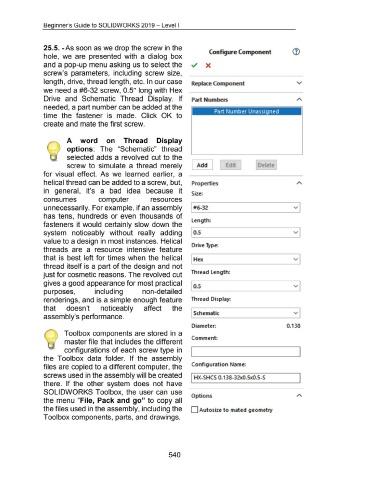
                                    25.5. -As soon as we drop the screw in the
                                                                                                                                                                          Configure Component
                                    hole,  we  are  presented  with  a  dialog  box


                                    and a pop-up menu asking us to select the                                                                                          X


                                    screw's  parameters,  including  screw size,


                                    length, drive, thread length, etc. In our case                                                                          Replace Component


                                    we need a #6-32 screw, 0.5" long with Hex


                                    Drive  and  Schematic  Thread  Display.  If                                                                             Part Numbers


                                    needed, a part number can be added at the
                                                                                                                                                                              Part Number Unassigned
                                    time  the  fastener  is  made.  Click  OK  to


                                    create and mate the first screw.


                                                       A  word  on  Thread  Display


                                                       options:  The  "Schematic"  thread


                                                       selected  adds a  revolved  cut to the


                                                       screw  to  simulate  a  thread  merely                                                               [ Add]                      Ed1t                     Delete


                                    for  visual  effect.  As  we  learned  earlier,  a


                                    helical thread can be added to a screw, but,


                                    in  general,  it's  a  bad  idea  because  it


                                    consumes                                     computer                                  resources


                                    unnecessarily. For example, if an assembly


                                    has  tens,  hundreds  or even  thousands  of


                                    fasteners  it would  certainly slow down  the


                                    system  noticeably  without  really  adding


                                    value to a design in most instances. Helical


                                    threads  are  a  resource  intensive  feature


                                    that is  best left for times  when  the  helical


                                    thread itself is a part of the design and  not


                                    just for cosmetic reasons. The revolved cut


                                    gives a good appearance for most practical


                                    purposes,                                 including                             non-detailed


                                    renderings, and is a simple enough feature


                                    that               doesn't                    noticeably                         affect                 the


                                    assembly's performance.


                                                     Toolbox components are stored in  a

                                                                                                                                                            Comment:
                                                     master file that includes the different


                                                     configurations of each screw type in                                                                                                                                                          I


                                    the  Toolbox  data  folder.  If  the  assembly


                                    files are copied to a different computer, the                                                                           Configuration Name:


                                    screws used in the assembly will be created
                                                                                                                                                           I HX-SHCS 0.138-32x0.5x0.5-S                                                            I
                                    there.  If the  other  system  does  not  have


                                    SOLIDWORKS Toolbox,  the  user can  use
                                                                                                                                                            Options
                                    the  menu  "File,  Pack and go" to copy all


                                    the files used in the assembly, including the                                                                          D Auto size to mated geometry


                                    Toolbox components, parts, and drawings.


                                                                                                                                         540

