


Page 540 - 02. Subyek Computer Aided Design - Beginner’s Guide to SOLIDWORKS 2019- Level 1 by Alejandro Reyes
P. 540
Assembly Modeling
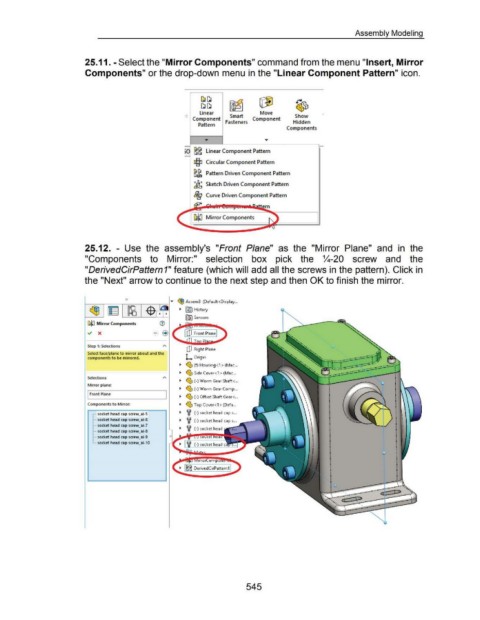
25.11. -Select the "Mirror Components" command from the menu "Insert, Mirror
Components" or the drop-down menu in the "Linear Component Pattern" icon.
[J~
~~ ~ G1J ~
linear Move
Component Smart Component Show
Pattern Fasteners Hidden
Components
Linear Component Pattern
c§:l Circular Component Pattern
~ Pattern Driven Component Pattern
a
.;a~ Sketch Driven Component Pattern
Bg Curve Driven Component Pattern
ern
Mirror Components
25.12. - Use the assembly's "Front Plane" as the "Mirror Plane" and in the
"Components to Mirror:" selection box pick the %-20 screw and the
"DerivedCirPattern 1" feature (which will add all the screws in the pattern). Click in
the "Next" arrow to continue to the next step and then OK to finish the mirror.
0
1--........-----,r-----r---.--- .... ~ Assem3 (Default<Display ...
~ -$ • ~ ~ [§5J History
fG1 Sensors
Gl~ Mirror Components
Step 1: Selections
C!J Right Plane
Select face/plane to mirror about and the
components to be mirrored. L Origin
~ ~ (f) Housing<1 >(Mac .. .
~ ~ Side Cover<1 > (Mac .. .
Selections
~ ~ (-)Worm Gear Shaft< .. .
Mirror plane:
~ ~ (-)Worm Gear Comp .. .
I Front Plane
~ ~ (-)Offset Shaft Gear< .. .
Components to Mirror: ~ ~ Top Cover<1 > (Defa .. .
r··· socket head cap screw_ai-5 ~ i (-)socket head caps .. .
~-··· socket head cap screw_ai-6 ~ i (-)socket head caps .. .
~-··· socket head cap screw_ai-7
~ i (-)socket head
~-··· socket head cap screw_ai-8 •
•
~-··· socket head cap screw_ai-9 I
•
•
L .. socket head cap screw_ai-10 I
•
•
_ ........
.. -··
545

