


Page 543 - 02. Subyek Computer Aided Design - Beginner’s Guide to SOLIDWORKS 2019- Level 1 by Alejandro Reyes
P. 543
Beginner's Guide to SOLIDWORKS 2019- Level I
View Insert Tools Window Help
I Q Redraw Ctri+R
t E t·t·
r n 1 1es
Screen Capture ~ L ~lei
Display/Delete Rep;
r Sketch Pattern • Relations Sket
Display LW~
Modify Entities
ltJJI ~
lights and Cameras
KS MBD '--------LL-"1...--J
------1
L Hide / Show Hide All Types ~[J
A~ All Annotations
Toolbars ~
•• __b_ ~
.-' Axes
Workspace ~
Temporary Axes T
User Interface 00 ~
~ Cameras
~ Full Screen F11
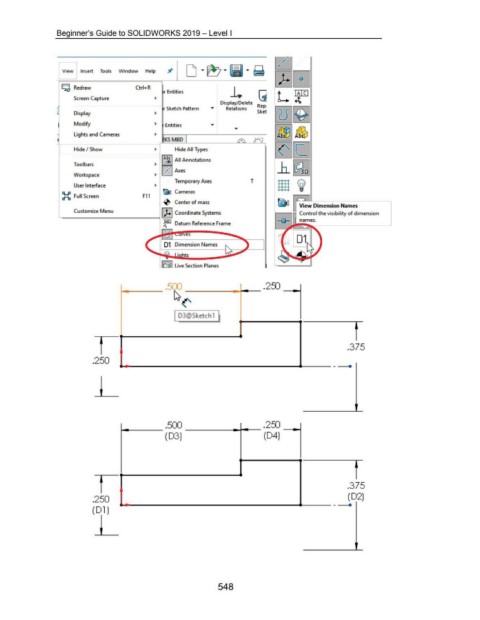
-0- Center of mass ITIJ View Dimension Names
L Customize Menu I J.l Coordinate Systems Control the visibility of dimension
----~
_tiel Datum Reference Frame
es
~ Live Section Planes
500 250
• . •
~<'
~
I D3@5ketch1
~
f
.375
.250
• - •
...,._ ___ .500 --------r--- .250 -..-.
(03) (04)
f
.375
.250 (02)
~-----------------------------------4------- •
(01)
548

