


Page 547 - 02. Subyek Computer Aided Design - Beginner’s Guide to SOLIDWORKS 2019- Level 1 by Alejandro Reyes
P. 547
Beginner's Guide to SOLIDWORKS 2019- Level I
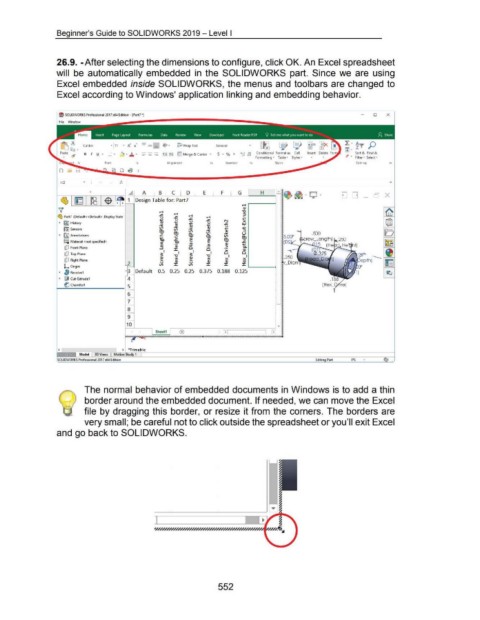
26.9. -After selecting the dimensions to configure, click OK. An Excel spreadsheet
will be automatically embedded in the SOLIDWORKS part. Since we are using
Excel embedded inside SOLIDWORKS, the menus and toolbars are changed to
Excel according to Windows' application linking and embedding behavior.
0 X
.a.f""l>. ~ Calibri General ~ IS- ~> AT p
U IF~~ - - i::::X:r-11 ~ • z
Past<! B 1 u • !+! • ~ ~ .!:!. ~ - - - 4-.0 .00 Conditional Format as C<!ll Insert Delete Sort & Find &
ot - +=: -+=: ~ Merge & Center • .00 -+.0
Formatting • Table ~ Styles ~ • • Filter • Select •
Font Alignmtnt Number r. Styles Editing
Cl
H2 y
0 A G H
1 Design Table for: Part7
..-l
Q)
..-l "'0
....
~ ..-l ::I
~ Part7 (Default< <Default> _Display State u ~ ..-l ..-l
+" u ~ ..s::. N +"
u
X
u
Q)
• G9J History ...:..: +" +" +" ..s::. LU
Q)
Q)
I
Vl ...:..: ...:..: Q) u +"
!ru Sensors Vl ...:..: +"
@J Vl Q) ::I
@J Vl .:.t! u
• [A) Annotations ~ +" @J @J Vl @J
o- ~ ~ E @J
8:::0 Material <not specified> c:: Q.O (1) E Q) ~
+"
(1)
Q)
[p Front Plane ~ :I: 0 0 > 0..
....
Q)
3:1 I 3:1 I 0 0
[p Top Plane
"'0 "'0 I I
Q)
Q) (1) .... (1) X X
cP Right Plane .... Q) Q) Q) Q)
u u
Vl :I: Vl :I: :I: :I:
L Origin .____--(I
Default 0.5 0.25 0.25 0.375 0.188 0.125
• ~ Revolve1
• @ Cut-Extrude1
~ Chamfer1
<
SOLIDWORKS Professional 2017 x64 Edition Part IPS •
The normal behavior of embedded documents in Windows is to add a thin
border around the embedded document. If needed, we can move the Excel
file by dragging this border, or resize it from the corners. The borders are
very small; be careful not to click outside the spreadsheet or you'll exit Excel
and go back to SOLIDWORKS.
~
r-
....
l ~
]
552

