


Page 545 - 02. Subyek Computer Aided Design - Beginner’s Guide to SOLIDWORKS 2019- Level 1 by Alejandro Reyes
P. 545
Beginner's Guide to SOLIDWORKS 2019- Level I


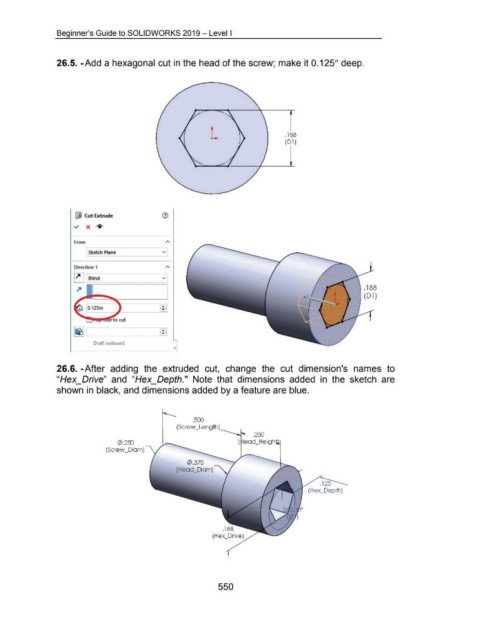
                                    26.5. -Add a hexagonal cut in the head of the screw; make it 0.125" deep .


                                                                                                                                                                                   . 188
                                                                                                                                                                                   (Dl)


                                                ~ Cut-Extrude


                                               ~  X  ~~


                                               From


                                                        Sketch Plane                                  v


                                               Direction 1


                                               ~ Blind                                                v
                                                           - -==========-____,

                                                                                                                                                                                                                                     .188

                                                                                                                                                                                                                                     (01)


                                                                                                     EEl


                                                                                                     &3]


                                                           Draft outward


                                    26.6. -After  adding  the  extruded  cut,  change  the  cut  dimension's  names  to


                                    "Hex_Drive"  and  "Hex_Depth."  Note  that  dimensions  added  in  the  sketch  are


                                    shown in black, and dimensions added by a feature are blue .


                                                                                                                          . 500
                                                                                                               (Screw _Length)


                                                                          (/) .2EJJ

                                                                   (Screw _Diam)


                                                                                                                      C/>.375

                                                                                                               (Head_Diam)


                                                                                                                                         550

