


Page 546 - 02. Subyek Computer Aided Design - Beginner’s Guide to SOLIDWORKS 2019- Level 1 by Alejandro Reyes
P. 546
Assembly Modeling


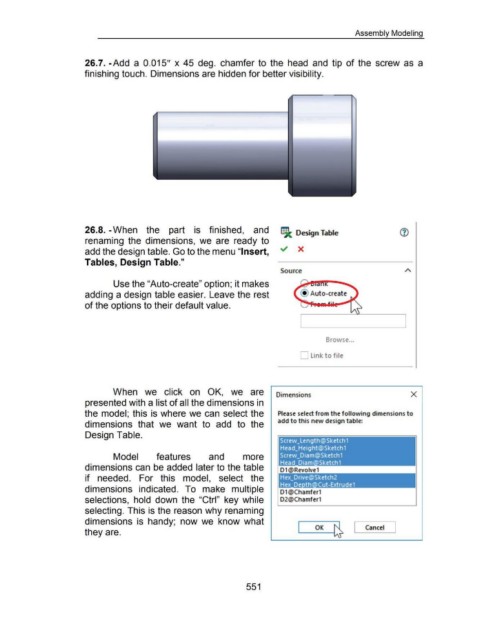
                                                      26.7. -Add  a  0.015"  x  45  deg.  chamfer to  the  head  and  tip  of the  screw  as  a


                                                      finishing touch. Dimensions are hidden for better visibility.


                                                      26.8. -When  the  part  is  finished,  and                                                                                 fil  Design Table


                                                      renaming  the  dimensions, we  are  ready  to


                                                      add the design table. Go to the menu "Insert,                                                                             ~  X


                                                      Tables, Design Table."


                                                                                                                                                                                Source


                                                                        Use the "Auto-create" option; it makes


                                                      adding a design table easier.  Leave the rest


                                                      of the options to their default value.


                                                                                                                                                                                                             Browse ...


                                                                                                                                                                                             D link to file


                                                                       When  we  click  on  OK,  we  are                                                                      Dimensions                                                                          X


                                                      presented with a list of all the dimensions in


                                                      the model; this is where we can  select the                                                                              Please select from the following dimensions to


                                                                                                                                                                               add to this new design table:
                                                      dimensions  that  we  want  to  add  to  the


                                                      Design Table.


                                                                        Model                      features                         and                  more


                                                      dimensions can  be added later to the table


                                                      if  needed.  For  this  model,  select  the


                                                      dimensions  indicated.  To  make  multiple                                                                                01 @Chamfer1


                                                      selections,  hold  down  the  "Ctrl"  key while                                                                           02@Chamfer1


                                                      selecting. This is the reason why renaming


                                                      dimensions  is  handy;  now we  know  what                                                                                                                                      Cancel  J

                                                                                                                                                                                                      OK  ~  [
                                                      they are.


                                                                                                                                                           551

