


Page 598 - 02. Subyek Computer Aided Design - Beginner’s Guide to SOLIDWORKS 2019- Level 1 by Alejandro Reyes
P. 598
Beginner's Guide to SOLIDWORKS 2019- Level I
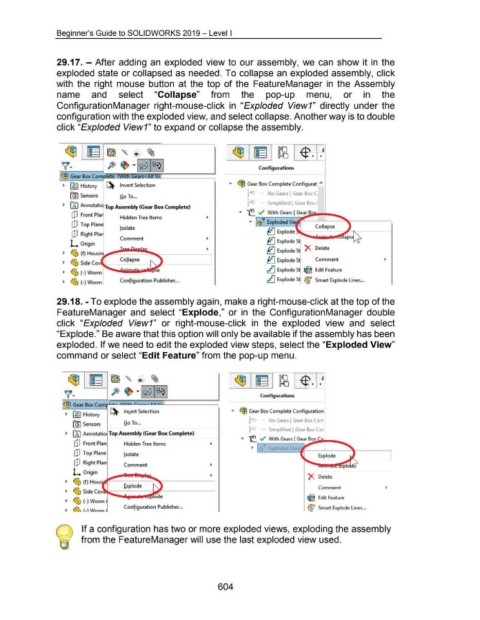
29.17.- After adding an exploded view to our assembly, we can show it in the
exploded state or collapsed as needed. To collapse an exploded assembly, click
with the right mouse button at the top of the FeatureManager in the Assembly
name and select "Collapse" from the pop-up menu, or in the
ConfigurationManager right-mouse-click in "Exploded View1" directly under the
configuration with the exploded view, and select collapse. Another way is to double
click "Exploded View1" to expand or collapse the assembly.
~ ~~"® ~
~· ft ~ ·r~~ ~~~ 1 Conf~gu rations
<§3 Gear Box Com '!lr"7~::;<;m:;;~------Jl
~ [§5) History ~ Invert Selection • <§3 Gear Box Complete Configurat "'
u ~ No Gears [ Gear BoAC
f9) Sensors Go To ...
n - - Simplified [ Gear Box t
~ fAJ Annotati Top Assembly (Gear Box Complete)
• 'f..r-~=-W_ith_G_e_ars_[ ---::Ge"""""ar_B ....,...._....._
dJ Front Pia Hidden Tree Items
• ~~ Exploded Vi
dJ Top Plan
!sol ate ~ Explode K
dJ Right Pia
Comment ~ Explode S aps~
L Origin
~ Explode S X Delete
~ ~ (f) Housi
Collapse ~ Explode S~ Comment
~ ~ Side Cov
~ ~ (-)Worm ............ ~-~"" ~ Explode S ~ Edit Feature
~ ~ (-)Worm Configuration Publisher ... ~ ExplodeS ~ Smart Explode Lines ...
29.18.- To explode the assembly again, make a right-mouse-click at the top of the
FeatureManager and select "Explode," or in the ConfigurationManager double
click "Exploded View1" or right-mouse-click in the exploded view and select
"Explode." Be aware that this option will only be available if the assembly has been
exploded. If we need to edit the exploded view steps, select the "Exploded View"
command or select "Edit Feature" from the pop-up menu.
~" ® ~
ft ~ ·I~~ 1~~ 1 Configurations
<§3 Gear Box Comr'-"'"~..........._.,~....._.._.L.LL...J. _____ _,
~ (;9) History ~ Invert Selection • ~ Gear Box Complete Configuration
u - No Gears [ Gear Box (orr
[G) Sensors Go To ...
n - - Simplified [ Gear Box Cor
~ fA) Annotatio Top Assembly (Gear Box Complete)
• ~. ~ With Gears [ Gear~Bo_..x ..,._.........._
[p Front Plan Hidden Tree Items
dJ Top Plane !so late Explode
cP Right Plan Comment
L Origin
X Delete
~ ~ (f) Hous·
Explode Comment
~ ~ SideCov -
~ ~ (-) Worm .........._~!i-lilllll!ll!~ ~ Edit Feature
.r;, Configuration Publisher ... ~ Smart Explode Lines ...
~ ~ f-)Wnrm
) If a configuration has two or more exploded views, exploding the assembly
from the FeatureManager will use the last exploded view used.
604

