


Page 599 - 02. Subyek Computer Aided Design - Beginner’s Guide to SOLIDWORKS 2019- Level 1 by Alejandro Reyes
P. 599
Assembly Modeling


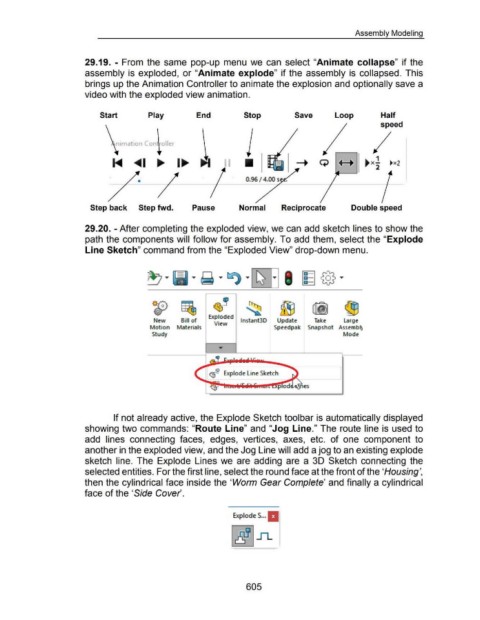
                                                      29.19.  - From  the same  pop-up menu  we  can  select "Animate collapse" if the


                                                      assembly is  exploded,  or "Animate explode" if the  assembly is  collapsed.  This


                                                      brings up the Animation Controller to animate the explosion and optionally save a


                                                      video with the exploded view animation.


                                                               Start                          Play                          End                          Stop                            Save                     Loop                         Half

                                                                                                                                                                                                                                               speed


                                                                              nation Con  oller


                                                                                                                                                                                                                                            1
                                                                                     ~ I                        1_..                                                                                                                 ~ x-            ~x2
                                                                                                                                                                                                                                            2


                                                                                                                                                           0.96 I 4.00 s  .


                                                         Step back                      Step fwd.                        Pause                         Normal                    Reciprocate                                 Double speed


                                                      29.20. -After completing the exploded view, we can add sketch lines to show the


                                                      path the components will follow for assembly. To add them, select the "Explode


                                                      Line Sketch" command from the "Exploded View" drop-down menu.


                                                                                                O.fo)             ~
                                                                                                 €T               ~


                                                                                                 New              Bill of          Exploded  lnstant3D                        Update                  Take              Large
                                                                                                                                       View
                                                                                               Motion  Materials                                                            Speedpak  Snapshot  Assembl)

                                                                                                Study                                                                                                                   Mode


                                                                                                                                    ~r:J?  Explode Line Sketch


                                                                                                                              ~
                                                                                                                                                                               pod


                                                                        If not already active, the Explode Sketch toolbar is automatically displayed


                                                      showing two commands: "Route Line" and "Jog Line." The route line is used to


                                                      add  lines  connecting  faces,  edges,  vertices,  axes,  etc.  of  one  component  to


                                                      another in the exploded view, and the Jog Line will add a jog to an existing explode


                                                      sketch  line.  The  Explode  Lines we  are  adding  are  a  30 Sketch  connecting  the


                                                      selected entities. For the first line, select the round face at the front of the 'Housing',


                                                      then the cylindrical face inside the 'Worm Gear Complete' and finally a cylindrical


                                                      face of the 'Side Cover.


                                                                                                                                                   ExplodeS ... .


                                                                                                                                                           605

