


Page 594 - 02. Subyek Computer Aided Design - Beginner’s Guide to SOLIDWORKS 2019- Level 1 by Alejandro Reyes
P. 594
Beginner's Guide to SOLIDWORKS 2019- Level I


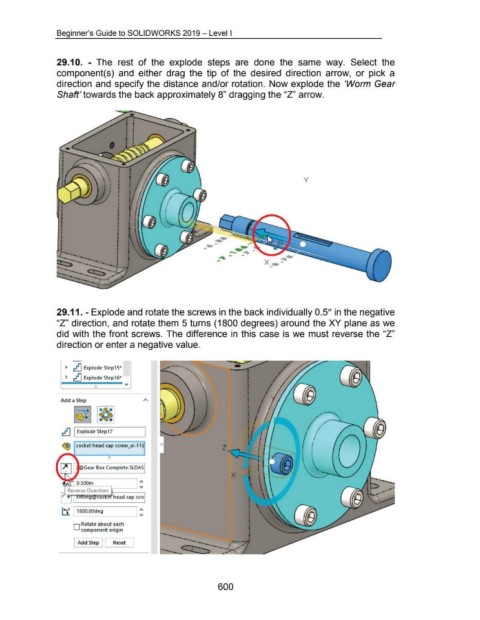
                                    29.1 0.  - The  rest  of  the  explode  steps  are  done  the  same  way.  Select  the


                                    component(s)  and  either  drag  the  tip  of the  desired  direction  arrow,  or  pick  a


                                    direction and specify the distance and/or rotation.  Now explode the  'Worm  Gear


                                    Shaft' towards the back approximately 8" dragging the "Z" arrow.


                                                                                                                                                                                               y


                                                                                                                                -       _ .... - -
                                                                                                                                                ....... ..... -


                                                                                                                                                                      X


                                    29.11. - Explode and rotate the screws in the back individually 0.5" in the negative


                                    "Z" direction, and rotate them 5 turns (1800 degrees) around the XY plane as we


                                    did with the front screws. The difference in  this case  is we  must reverse the "Z"


                                    direction or enter a negative value.


                                          ~  ~ Explode Step15~


                                          ~  ~ Explode Step16~


                                                            0


                                       Add a Step


                                                                                                                                                                                                           , .. -
                                                                                                                                                                                                         ,.         ----~
                                                                                                                                                                                                                          .--........
                                                                                                                                                                                                        /
                                        ~ I Explode Step17                                                                                                                                             L
                                                                                                                                                                                                      '  •
                                                                                                                                                                                                     •  ,
                                        ~ socket head cap screw_ai-11 ~


                                                                    0


                                                     Gear Box ·Complete.SLDAS


                                                                                        "'
                                         ln":"~~:-=:-=-:=~--__j 'V


                                        ~ 11800.00deg                                 I :


                                               D Rotate about each
                                                    component origin


                                                 Add Step               Reset       ]


                                                                                                                                         600

