


Page 589 - 02. Subyek Computer Aided Design - Beginner’s Guide to SOLIDWORKS 2019- Level 1 by Alejandro Reyes
P. 589
Assembly Modeling


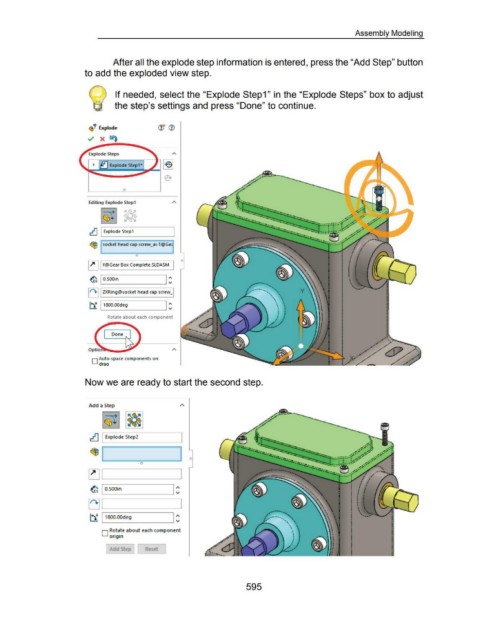
                                                                        After all the explode step information is entered, press the "Add Step" button


                                                      to add the exploded view step.


                                                                         If needed, select the "Explode Step1 " in the "Explode Steps" box to adjust


                                                                         the step's settings and press "Done" to continue.


                                                        ~'!?  Explode


                                                        ../ X ~


                                                           ~  ~ Explode Step1*


                                                                              0


                                                        Editing Explode Step1


                                                         .tJ I Explode Step1


                                                         ~ socket head cap screw_ai-1@Gec


                                                        ~ I Y@Gear Box Complete.SLDASM  I


                                                                                                         I ~
                                                         ~ I  O.SOOin


                                                        1~+11 ZXRing@socket head cap screw_l


                                                                                                         I ~
                                                         ~ I 1800.00deg


                                                                    Rotate about each component


                                                                       Done


                                                          D Auto-space components on

                                                               draa


                                                      Now we are ready to start the second step.


                                                        Add a Step


                                                         ~ I Explode Step2


                                                                                                             I ~
                                                         ~ I  O.SOOin


                                                        ~ .._____ ___ ______.


                                                         ~ 11800.00deg


                                                                 0  R~t~te about each component
                                                                     Origin


                                                                        dd Step             Reset


                                                                                                                                                           595

