


Page 590 - 02. Subyek Computer Aided Design - Beginner’s Guide to SOLIDWORKS 2019- Level 1 by Alejandro Reyes
P. 590
Beginner's Guide to SOLIDWORKS 2019- Level I


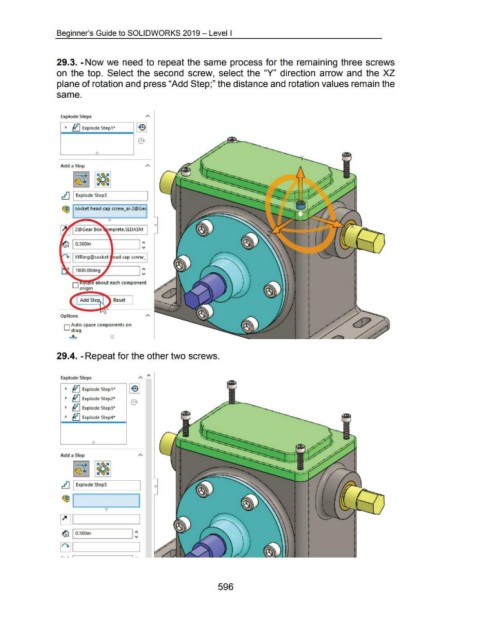
                                    29.3. -Now we need to repeat the same process for the remaining three screws


                                    on  the top.  Select the second  screw,  select the  "Y"  direction  arrow and  the  XZ


                                    plane of rotation and press "Add Step;" the distance and rotation values remain the


                                    same.


                                       Explode Steps                                        A
                                                                                      lei
                                          ~  ~ Explode step1*


                                       Add a Step


                                                                                                                                                                             ·:--
                                                                                                                                                                             ~ .. :.
                                       ~ I Explode Step3                                                                                                                   ~
                                                                                                                                                                             ......... ..
                                                                                                                                                                                    . ....

                                        <9:J  socket head cap screw_ai-2@Gec


                                                                     0

                                                                     mplete.SLDASM


                                                                                          1'.
                                                O.SOOin
                                              L__ ________ __J  'V


                                                XYRing@sock:et  e,ad cap screw_.


                                                                                          1'.
                                               ,....----___,.. --------' 'V

                                              0  .. e about each component
                                                   ongm


                                                                        Reset


                                       Options

                                         D Auto-space components on
                                             drag

                                            ....;L


                                    29.4. -Repeat for the other two screws.


                                       Explode Steps


                                          ~  ~ Explode Step1*

                                          ~  ~ Explode Step2*


                                          ~  ~ Explode Step3*

                                          ~  ~ Explode Step4*


                                                           0


                                       Add a Step


                                                                                        I
                                       ~ I Explode StepS


                                        <9:1 I                                         I


                                       ~ IL___ __ ____.


                                                                                   1:
                                       ~ I  O.SOOin


                                       ~ IL___ __ ____.


                                       .. ~  ,-------,


                                                                                                                                         596

