


Page 585 - 02. Subyek Computer Aided Design - Beginner’s Guide to SOLIDWORKS 2019- Level 1 by Alejandro Reyes
P. 585
Beginner's Guide to SOLIDWORKS 2019- Level I


                                                        Default selection behavior                                                                             Selection holding "Shift" key


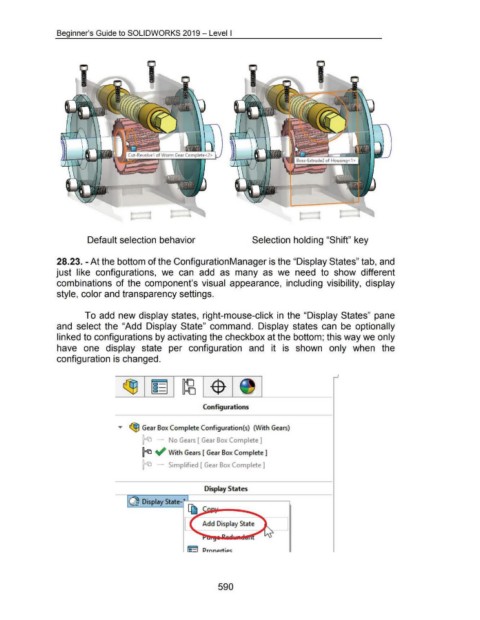
                                    28.23. -At the bottom of the Configuration Manager is the "Display States" tab, and


                                    just  like  configurations,  we  can  add  as  many  as  we  need  to  show  different


                                    combinations  of the  component's visual  appearance,  including  visibility,  display


                                    style, color and transparency settings.


                                                      To add  new display states, right-mouse-click in  the "Display States" pane


                                    and  select the  "Add  Display  State"  command.  Display  states  can  be  optionally


                                    linked to configurations by activating the checkbox at the bottom; this way we only


                                    have  one  display  state  per  configuration  and  it  is  shown  only  when  the


                                    configuration is changed.


                                                                                                                                Configurations


                                                                           ...,..  ~ Gear Box Complete Configuration(s)  (\Nith Gears)


                                                                                           ~'"'  -         No Gears [ Gear Box Complete]


                                                                                          ~ ~ With Gears [ Gear Box Complete 1


                                                                                             '"'  -       Simplifiea [ Gear Box Complete 1


                                                                                                                                 Display States


                                                                                                                    lJ         Add Display State


                                                                                                                                         590

