


Page 584 - 02. Subyek Computer Aided Design - Beginner’s Guide to SOLIDWORKS 2019- Level 1 by Alejandro Reyes
P. 584
Assembly Modeling


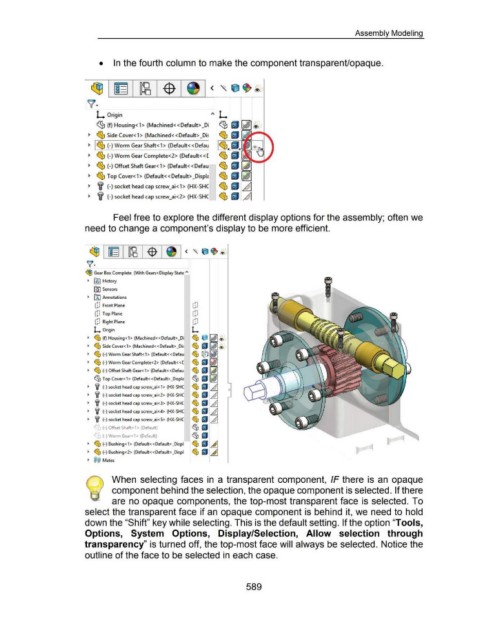
                                                               •  In the fourth column to make the component transparent/opaque.


                                                          ~ ~=  ltB  $                                                              <  ' e ~®


                                                       ~·                                                                                       I


                                                             L Origin                                                                ~'>  L


                                                             ~(f) Housing<1> (Machined <<Default> _Di                                     ~ ~ ~ ®

                                                        ._  ~ Side Cover< 1 > (Machined<< Default> _Di~                                   ~ ~ ji&w.--1111....


                                                        ._  ~ ~ (-)Worm GearShaft<1>  (Default<<Defau                                     ~ I(J


                                                        ._  ~ (-) Worm Gear Complete< 2>  (Default<< [                                    ~ ~


                                                        ._  ~ (-) Offset Shaft Gear< 1 > (Default<< Defau                                 ~ ~ [41


                                                        ._  ~ Top Cover< 1 > (Default<< Default> _Displc                                  ~ I(J [0]
                                                                                                                                          ~ ~ ..LJ
                                                        ._  lf (-)socket head cap screw_ai<1>  (HX-SHC


                                                        ._  lf (-)socket head cap screw_ai<2>  (HX-SHC                                    ~ I(J  /1


                                                                        Feel free to explore the different display options for the assembly; often we


                                                      need to change a component's display to be more efficient.


                                                         ~ 1 ~ 1 ~ 1 -<D· i


                                                       ~--

                                                      (93  Gear Box Complete  (With Gears< Display State~


                                                        .,  f§J  History

                                                           [9) Sensors


                                                        .,  fAl Annotations

                                                            [JJ  Front Plane

                                                            ClJ  Top Plane

                                                            [JJ  Right Plane

                                                            L  Origin

                                                        .,  ~ (f) Housing<1 > (Machined«Default>_Di


                                                        ._  ~ Side Cover<1 > (Machined< <Default> _Di!

                                                        ._  ~ (-) Worm Gear Shaft<1> (Default«Defau

                                                        ._  ~ (-) Worm Gear Complete<2> (Default« [

                                                        .,  ~ (-) Offset Shaft Gear<1>  (Default«Defau

                                                            %Top Cover<1> (Default« Default> _Displc

                                                        ._  lf  (-) socket head cap screw_ai<1> (HX-SHC


                                                        ._  lf  (-) socket head cap screw_ai<2> (HX-SHC

                                                        .,  lf  (-) socket head cap screw_ai<3> (HX-SHC

                                                        ._  lf  (-) socket head cap screw_ai<4> (HX-SHC

                                                        ._  lf  (-) socket head cap screw_ai<5> (HX-SHC

                                                              I
                                                              )  (-)Offset Shaft<1>  (Default)

                                                            ~(-)Worm Gear<1>  (Default)

                                                        ._  ~ (-) Bushing<1> (Default«  Default> _Displ

                                                        ._  ~ (-) Bushing<2> (Default«  Default> _Displ

                                                        .,  @@  Mates


                                                       ~         1     When  selecting faces  in  a transparent component,  IF there  is  an  opaque


                                                       '\~(  component behind the selection, the opaque component is selected. If there


                                                                       are no opaque components, the top-most transparent face is  selected. To


                                                      select the transparent face if an opaque component is behind it, we need to hold


                                                      down the "Shift" key while selecting. This is the default setting. If the option "Tools,


                                                      Options,  System  Options,  Display/Selection,  Allow  selection  through


                                                      transparency" is turned off, the top-most face will always be selected. Notice the


                                                      outline of the face to be selected in each case.


                                                                                                                                                           589

